
Achieve High Performance with Content Delivery Networks (CDNs)
Introduction to Content Delivery Networks (CDNs)
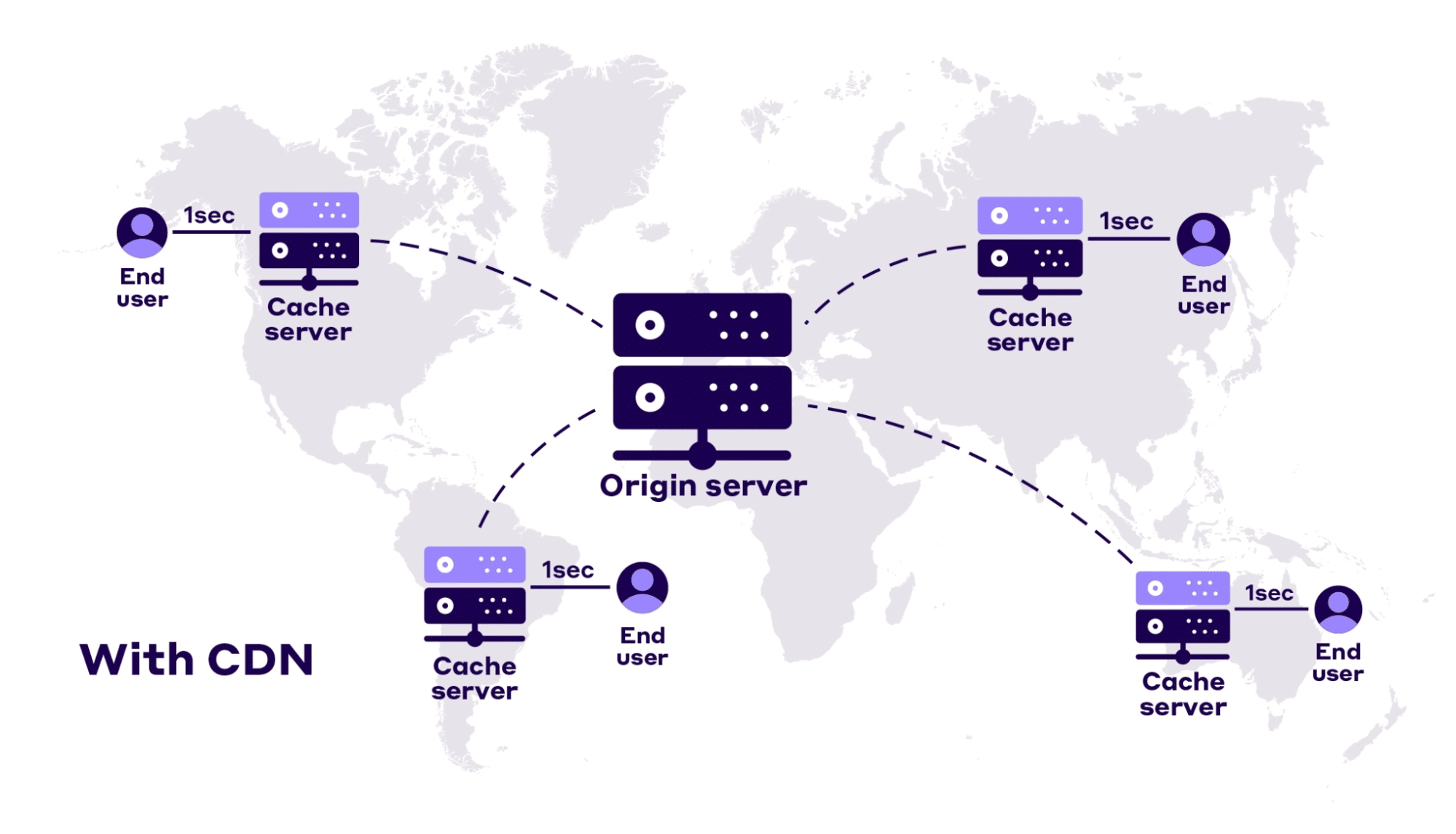
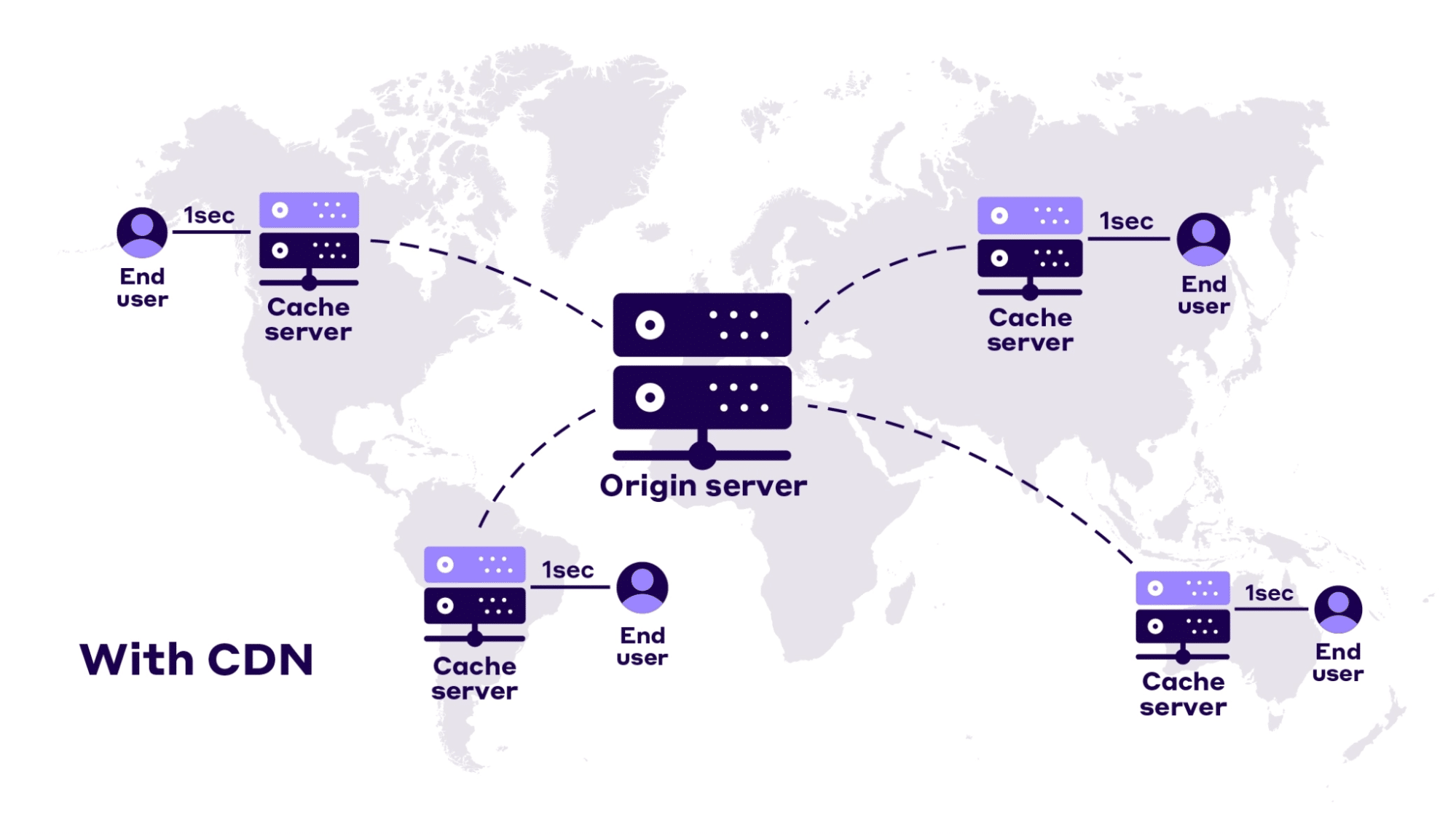
Content Delivery Networks (CDNs) are systems of distributed servers that work together to deliver content to users quickly and efficiently. They serve as a bridge between content providers and users, ensuring that content is delivered rapidly and securely with minimal delay. CDNs also add extra layers of security against malicious threats.
When a user requests content, the CDN routes the request to the server closest to the user. This reduces the number of hops and speeds up delivery, improving page load times significantly. It ensures content is available faster and more reliably.
CDNs are especially useful for websites with a global user base. They store cached versions of content across multiple locations, enabling users to access data quickly regardless of where they are located. This lowers bandwidth usage and ensures consistent access even if the origin server is slow or overloaded.
In short, CDNs are crucial for businesses that want to deliver high-performance content while also improving speed, security, and cost-efficiency.
What Are the Benefits of Using CDNs?
Using a CDN offers several key benefits that improve website performance and reliability. With content stored across global servers, users can access content faster and more smoothly. Here are the main advantages:
- Speed: CDNs reduce latency by caching content closer to the end-user, enabling quicker load times.
- Cost savings: They lower bandwidth expenses by reducing the strain on your main server.
- Scalability: CDNs handle large volumes of traffic without needing major infrastructure upgrades.
- Security: Enhanced security features like SSL, encryption, and DDoS protection protect against cyber threats.
- Reliability: With content distributed across multiple servers, CDNs reduce downtime during traffic surges.
CDNs also reduce the burden on your web host. Most of the content delivery is handled by the CDN, improving uptime and reducing the need for frequent server upgrades. The result is a faster, more secure, and cost-effective way to serve content.
Types of Content Delivery Networks
Different types of CDNs serve different purposes based on how content is delivered. The two primary types are Origin-Pull and Push CDNs.
Origin-Pull CDNs fetch content from the main server only when requested. This method improves efficiency, ensures security, and reduces storage costs. It is ideal for content that doesn’t change frequently.
Push CDNs require content to be manually uploaded to the CDN. This method speeds up delivery for static assets and offers flexibility in how and when content is updated.
Other CDN types include:
- Load-balancing CDNs: Distribute traffic evenly across multiple servers.
- Edge CDNs: Deliver content from the server closest to the user.
- Multi-CDNs: Use multiple CDN providers to optimize delivery and prioritize important content.
Choosing the right type of CDN depends on the kind of content you deliver and your speed, security, and cost requirements.
Understanding Content Delivery Network Providers & Networks
When setting up a CDN, it’s important to understand your provider options. Different CDN services offer specialized features such as video streaming, static content caching, or HTTP optimization.
Research each provider’s offerings, contract terms, and pricing. Some offer free trials so you can evaluate speed and reliability before committing. Pricing models also vary—some offer flat-rate plans, while others use pay-as-you-go options.
Pay attention to the size and reach of the CDN’s network. Providers with more global nodes can deliver content faster to a wider audience. Choose a provider that aligns with your performance, coverage, and budget needs.
Setting Up & Configuring Your CDN
Choosing Your CDN Provider
Start by selecting a reliable CDN provider. Compare providers based on speed, security, features, and cost. Look for reviews and available support to ensure long-term value.
Configuring Your CDN
Once you’ve chosen a provider, configure your CDN settings. This includes connecting your domain, setting caching rules, and enabling security features like SSL. Each provider may offer unique configuration options, so follow their documentation closely.
Implementing Your CDN
To implement your CDN, update your website settings to point assets (like images, scripts, and videos) to the CDN. Some platforms offer plug-ins for easier integration. If not, you may need to manually modify your HTML or CMS settings.
Testing & Monitoring Your CDN Performance
After implementation, use tools like PageSpeed Insights or your CDN’s built-in analytics to test load times, cache hit ratios, and overall performance. Monitor these metrics regularly to ensure peak performance.
CDN Optimization for Maximum Performance
To get the most out of your CDN, optimize it regularly. Key optimization tasks include:
- Caching: Ensure all static resources are cached properly to reduce load times.
- Compression: Use Gzip or Brotli to compress files and save bandwidth.
- Resource hosting: Move all media files and large assets to the CDN for faster delivery.
- Load balancing: Distribute traffic evenly across servers to prevent overload.
- HTTP/2: Enable for faster multiplexed resource delivery.
Monitor your CDN performance and adjust configurations as needed. Continual optimization ensures better speed, security, and scalability.
Measuring CDN Performance & Efficiency
Measuring performance is essential to understanding your CDN’s impact. Use tools like Pingdom, GTmetrix, or Google PageSpeed Insights to track load time, cache efficiency, and response rates.
Also, monitor user experience by reviewing page interactions and bounce rates. If users report slowdowns or errors, investigate and resolve them quickly.
Track bandwidth usage and ensure your CDN settings are not exceeding limits. Monitor cache hit rates and adjust as needed to boost efficiency.
Testing & Troubleshooting a CDN
Regular testing and troubleshooting help keep your CDN running smoothly. Here’s how to maintain performance:
- Run speed tests using tools like PageSpeed Insights.
- Set monitoring alerts for performance issues or outages.
- Perform stress tests to assess how your CDN handles heavy traffic.
- Check cache configuration and validate file delivery from the right nodes.
Proactive troubleshooting prevents minor issues from becoming major disruptions.
Integrating with an Existing Content Delivery System
If you already use a content delivery system, integrating it with a CDN can improve performance and reduce latency. Set up rules so your system knows when to pull content from the CDN instead of your own servers.
Configure cache rules and server mappings correctly. Ensure your system can detect edge locations and adjust its delivery patterns accordingly.
After integration, test thoroughly. Monitor logs, run performance checks, and review user feedback to validate proper setup and identify improvement areas.
Securing Your Data with a CDN
Security is a key benefit of using a CDN. Most providers offer built-in features such as:
- SSL encryption
- Secure token authentication
- DDoS protection
- Firewall integration
Enhance protection further by monitoring network activity and applying data access restrictions. Use content protection systems to guard sensitive files and prevent unauthorized access.
Managing & Maintaining a High Performance Content Delivery Network
To maintain a high-performing CDN, you need regular monitoring and maintenance. Start by setting clear goals for performance, content types, and update frequency.
Use performance dashboards to track uptime, bandwidth use, and error logs. Implement CDN optimization tools and enable threat detection systems for security.
Regularly update your software and apply patches. Schedule routine maintenance and reassess configurations to meet changing performance needs.
Conclusion: CDNs for High Performance
CDNs are essential tools for delivering high-performance websites and applications. They reduce latency, improve speed, and offer robust security measures. With the right configuration and monitoring, a CDN can significantly enhance user experience and reduce operational costs.
From selecting the right provider to optimizing performance and securing data, each step plays a critical role in ensuring success. Whether you’re building from scratch or integrating into an existing system, a well-managed CDN will boost reliability, scalability, and speed.
Related Reading
- Accelerate Content Delivery: Introduction to CDNs
- Boost Website Performance with Dynamic Content Personalization
- Find Your Competitor’s Edge: Content Performance Benchmarking
Planning a content platform?
Headless, traditional, or custom — we help teams pick and build the CMS architecture that fits how they actually work.
CMS strategy, architecture, and implementation.
Discuss your CMSA technical conversation, not a sales pitch.