Blog

A “blog,” short for “weblog,” is an online platform where individuals, organizations, or businesses regularly publish written content in a chronological order. These posts, often written in an informal and conversational style, cover a wide range of topics, including personal experiences, hobbies, news, opinions, and expertise in various fields. Blogs provide a means for authors, known as bloggers, to share information, express their thoughts, and engage with a readership through comments and discussions. Blogs can serve as a creative outlet, a marketing tool, or a source of information and entertainment. They have become an essential part of the digital landscape, with many blogs addressing niche interests and contributing to the dissemination of information and ideas on the internet.

Unlock Content Retention Strategies
Blog

Unlock Content Retention Strategies: Leverage a CMS

Defining Content Archiving and Retention Strategies If you manage a website, blog, or digital records, you need a clear strategy for content archiving and retention. This means understanding what content to keep, when to archive it, and how to store it securely for future access. Creating an effective system requires careful planning and knowledge of relevant regulations. You must consider the type of content, how long it stays valid, and how users will access it. Here are two key concepts to understand: Archiving: This involves deciding which content should be stored and preserved for future reference. It also includes steps to back up files, protecting them from loss or technology changes. Retention: Retention refers to how long content should be kept. Regulatory or industry requirements usually determine this. A good system tracks expiration dates effectively. Once you understand your needs, decide whether to manage this manually or use software like a content management system (CMS). Either option can work depending on your organization’s size and

Read More »
Implementing Content Import-Export Functionality
Blog

CMS Get Connected: Implementing Content Import/Export Functionality

Introduction Content import and export are essential features of any content management system (CMS). Content migration refers to transferring data from one CMS to another or upgrading to a newer version of the same CMS. This process is crucial for maintaining content accuracy, especially during a transition. It helps keep data secure and preserves existing SEO benefits. Content migration also allows you to track changes over time, making it easier to recover content after accidental updates or system issues. Often, import and export functions are overlooked during CMS changes or upgrades. However, it’s vital to implement and test migration processes thoroughly before launching a new system. In this guide, we’ll explore the key aspects of CMS content import and export. Topics include identifying components of content export, analyzing plugins to simplify the process, considering manual migration, and defining requirements and goals for success. Identify the Key Components of Content Export Successful content export requires understanding its core elements. Before starting any migration, identify the following

Read More »
CMS Solutions for Multisite and Multitenant Environments
Blog

Build Your Own CMS Solutions for Multisite and Multitenant Environments

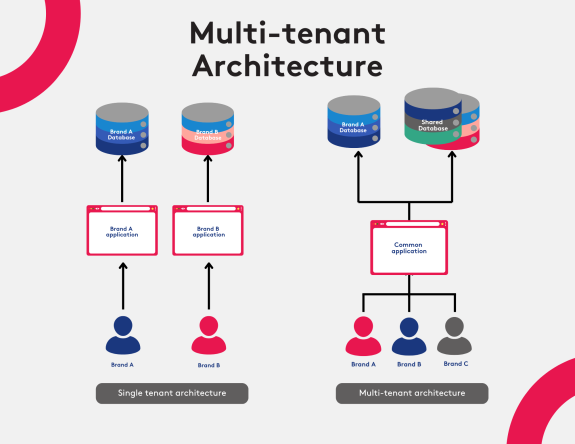
Introduction: Definition of Multisite and Multitenant Environments In today’s digital world, businesses must efficiently manage multiple websites and services on a single infrastructure. This is where the concepts of “multisite” and “multitenant” environments become crucial. A multisite environment allows multiple websites to operate on a single server or platform. A multitenant environment enables several tenants to share a single application or website. Multisite setups are ideal for organizations that operate different websites under separate domains. This centralized management reduces hosting costs and allows for easy sharing of resources and information across all sites. It also ensures consistency and simplifies updates across platforms. On the other hand, multitenant environments are best for organizations offering services to multiple clients. These setups let multiple tenants securely use and manage a shared platform. Each tenant gets a tailored experience, while all data and apps are controlled from a single system. Overall, managing multiple websites and services from a unified platform reduces costs and improves efficiency. Understanding multisite and multitenant

Read More »
Discover CMS Analytics and Reporting
Blog

Leverage Data for Insights: Discover CMS Analytics and Reporting

Introduction to CMS Analytics CMS analytics is a data-driven approach to understanding how visitors interact with your website. Using advanced software, you can track user behavior, analyze key metrics, refine business decisions, and apply machine learning for predictions and planning. This guide introduces the basics of CMS analytics and how to leverage it effectively. You’ll discover the benefits of running analytics reports, which metrics to monitor, and how to make strategic decisions based on data. By the end, you’ll understand how to use CMS analytics to unlock your website’s full potential. With CMS analytics, you gain insights into visitor behavior and preferences, helping you optimize your website. It also improves your understanding of customer needs, enabling accurate targeting and a better user experience. Moreover, you can use analytics for long-term strategies by leveraging predictive analytics to forecast trends and plan ahead. This allows your business to anticipate changes and be well-prepared. CMS analytics is essential for website owners aiming to optimize performance and gain actionable

Read More »
B2B Content for Decision-Makers
Blog

Tailor Your B2B Content for Decision-Makers: A Guide

Introduction to Content Personalization in B2B Marketing Content personalization plays a crucial role in B2B marketing success. By customizing content for decision-makers, businesses can boost engagement and improve conversion rates. This guide explores how to personalize content effectively, including understanding different decision-maker roles, using various B2B content formats, and crafting targeted messages for each role. Content personalization means tailoring content to the specific needs of an individual or group. It makes the content more relevant and engaging by focusing on topics that matter most to the audience. Using customer data and insights, businesses can create personalized experiences that resonate with their target audience. The main goal is to develop content that directly appeals to decision-makers. Since every buyer has different needs, understanding your audience is key to crafting impactful content. A well-executed personalization strategy can dramatically improve B2B marketing outcomes. Understanding the Different Decision Maker Roles Identifying the roles of decision-makers is essential in B2B marketing. Each business has unique needs, and it’s important to

Read More »
Real-time Collaboration
Blog

Ready to add Real-time Collaboration to Your CMS? Here’s How

Introduction to Real-Time Collaboration Features Real-time collaboration features allow multiple users to work on the same content, document, or task in a CMS (Content Management System). Any edits or changes made by one user are immediately visible to others. This leads to improved efficiency and better teamwork. These features are especially useful for teams working on websites, blogs, or intranet systems. They make it easy to securely share data and manage tasks without losing control over the content. Real-time collaboration tools include shared editing, live messaging, file sharing, and project tracking. These tools keep everyone updated and help teams work more effectively. Key benefits of real-time collaboration include: Increased productivity: Faster communication leads to better project outcomes. Cost savings: Avoids duplication and reduces reliance on emails or version control. Secure data sharing: All data is stored in one secure place, reducing security risks. Instant communication: Teams can interact and respond quickly as work progresses. While the benefits are clear, implementing these features in a CMS

Read More »