
A Comprehensive Comparison web app vs native app
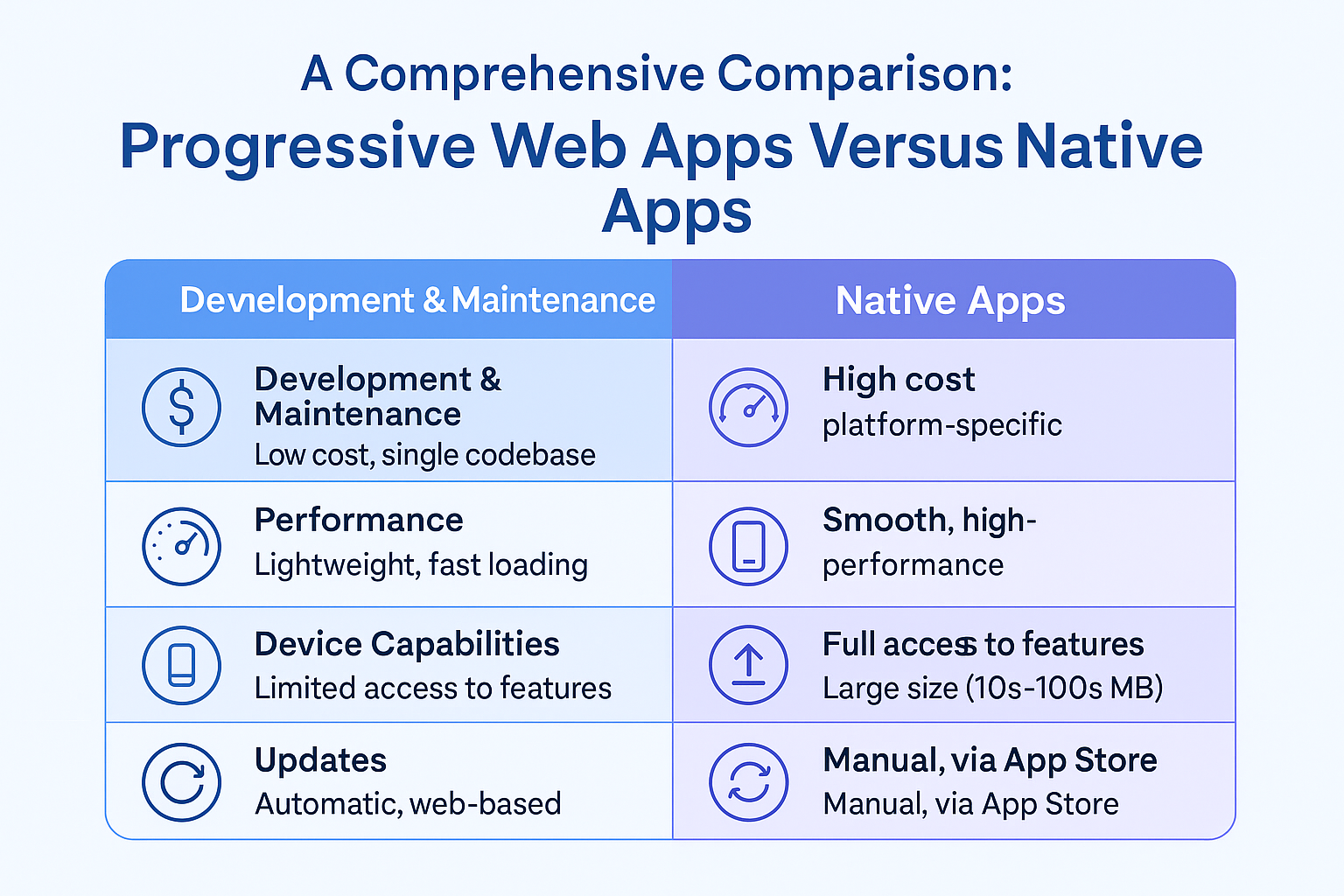
A Comprehensive Comparison: Progressive Web Apps Versus Native Apps
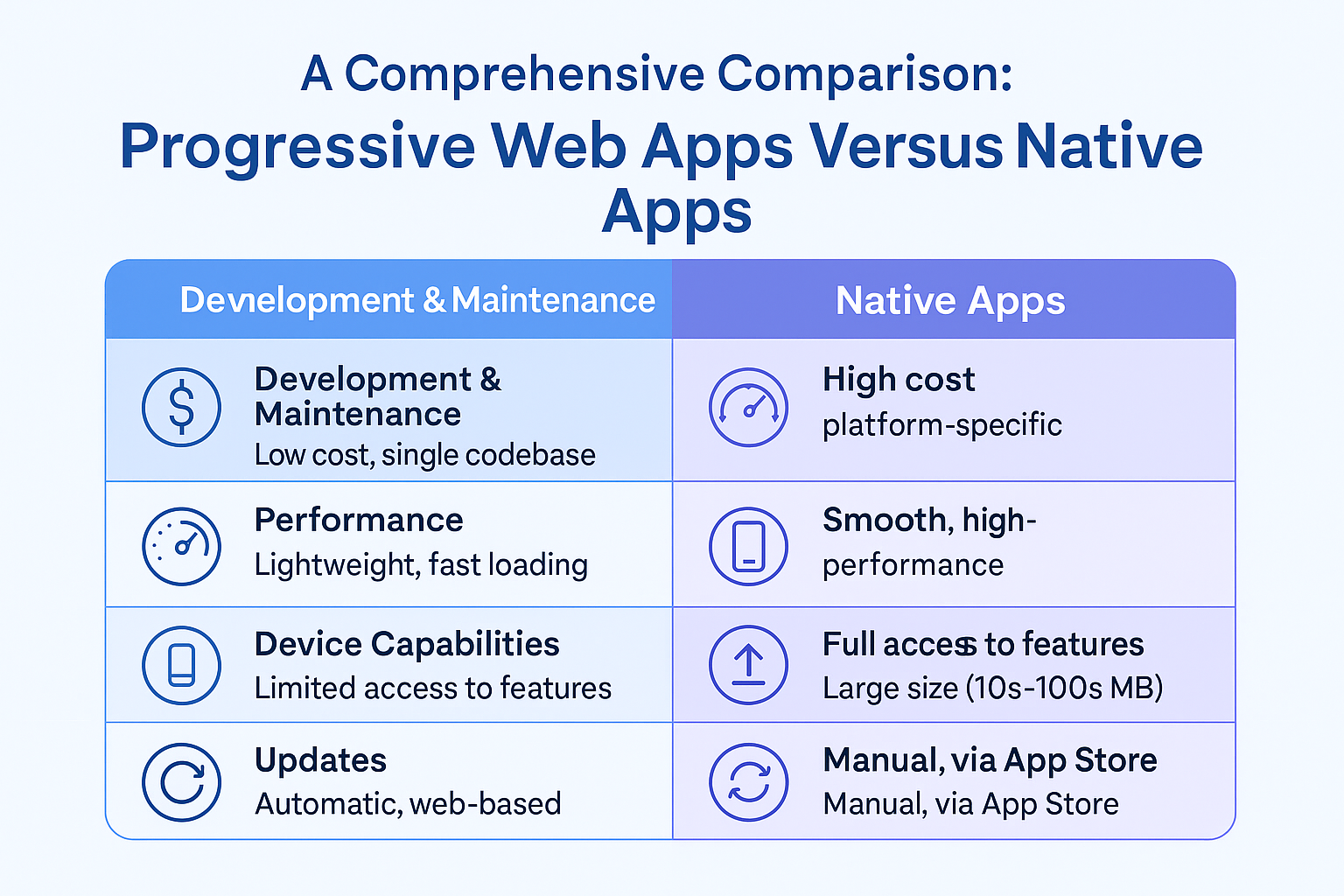
In today’s digital world, the competition between progressive web apps and native apps has become an increasingly contentious issue. For companies and developers alike, understanding the nuances of progressive web apps and native apps is critical to ensure the success of their project.
This article provides a comprehensive comparison between the two, examining:
- User experience and interaction
- Performance and load times
- Offline functionality and accessibility
- Platform compatibility and cross-platform support
- App analytics and data tracking
- Usability testing and user research
- Integration with third-party services and APIs
Through a thorough and objective analysis, this article will help equip developers and companies with the necessary knowledge to make informed decisions about which technology to use for their projects.
Introduction
Progressive Web Apps (PWAs) and native apps are two distinct types of mobile applications, each offering unique advantages and limitations. Choosing between the two requires a deep understanding of how they impact development workflows, performance, and user experience.
B. Importance of Choosing the Right App Approach
Choosing the right app model is crucial for project success, especially when considering:
- Service workers and caching strategies
- User engagement methods
- User interface and design considerations
- Development and maintenance costs
- Scalability and platform support
User Experience and Interaction
A. User Experience in PWAs
PWAs offer a streamlined interface with fast load times and simplified navigation. They’re accessible directly from the browser and often update in the background. Additionally, usability testing is easier to perform and gather feedback due to web accessibility.
B. User Experience in Native Apps
Native apps provide deeper integration with platform-specific features like the camera, GPS, and fingerprint sensors. They also offer stronger offline capabilities and better overall performance in areas like animation and transitions, but often require more storage space and installation time.
Performance and Load Times
A. Performance Optimization in PWAs
PWAs benefit from performance practices such as minification, code splitting, CDN usage, and service worker caching. Since they load via the browser, they eliminate install friction and perform well on varied network conditions.
B. Performance Optimization in Native Apps
Native apps can fully leverage hardware resources and optimize performance using platform-specific tools. Performance is managed through background threading, load balancing, server-side scaling, and tightly controlled UI frameworks.
Offline Functionality and Accessibility
A. Offline Functionality in PWAs
PWAs leverage service workers to cache content and enable offline access. They also support progressive enhancement and include features like offline forms, accessible navigation, and responsive layouts that work across devices.
B. Offline Functionality in Native Apps
Native apps handle offline data through local databases, secure storage, and background sync. They can run background services even when the app isn’t active, allowing for real-time syncing once the connection is restored.
Platform Compatibility and Cross-Platform Support
A. Platform Compatibility in PWAs
PWAs are inherently cross-platform, accessible via browsers on iOS, Android, and desktops. They’re device-agnostic and built to adapt responsively to screen sizes and input types.
B. Platform Compatibility in Native Apps
Native apps require separate codebases for different platforms (e.g., Swift for iOS, Kotlin for Android), leading to higher costs and longer development time. However, they provide a more integrated and polished experience on their target platform.
Development and Implementation Complexity
A. Development Complexity in PWAs
PWAs are faster and cheaper to develop, as a single codebase supports multiple platforms. They’re easier to update, require no app store approvals, and offer robust analytics via web tracking tools.
B. Development Complexity in Native Apps
Native app development involves platform-specific SDKs, stricter UI/UX guidelines, and longer release cycles due to app store submissions. Despite the complexity, they offer richer capabilities and better performance for intensive applications.
Access to Device Hardware and APIs
A. Device Hardware Access in PWAs
Progressive Web Apps (PWAs) offer growing support for accessing device hardware such as cameras, GPS, and other capabilities. By leveraging Service Workers and caching techniques, PWAs can interact with device hardware without requiring a direct connection.
PWAs also prioritize user-friendly interfaces, ensuring seamless access to device features with minimal friction. In contrast, Native Apps require users to access hardware via deeper system-level settings, often making the process less intuitive.
In summary, PWAs simplify access to device hardware compared to Native Apps, offering a smoother user experience.
B. Device Hardware Access in Native Apps
Native Apps provide robust access to device hardware but often require users to adjust system settings, which may hinder usability. Native development must account for hardware-level permissions, feature detection, and cross-device compatibility.
To ensure usability and security, developers must perform thorough testing and implement strong safeguards. When executed properly, native apps deliver powerful and secure hardware integrations.
App Updates and Maintenance
A. App Updates and Maintenance in PWAs
PWAs are web-based and benefit from seamless, instant updates that do not rely on app store approvals. Developers follow open web standards rather than platform-specific submission guidelines.
Key advantages of PWAs for updates include:
1. No app store dependency
2. Faster deployment and updates
3. Greater flexibility for bug fixes and enhancements
This allows businesses to respond quickly to market needs without being restricted by platform review cycles.
B. App Updates and Maintenance in Native Apps
Native app updates require navigating app store approval processes, which can delay releases. Developers use Continuous Integration/Continuous Deployment (CI/CD) tools to manage updates and versioning.
Native apps benefit from advanced user engagement features like push notifications and offline access. Analytics tools are used for tracking usage and improving app performance.
While more resource-intensive, native apps deliver structured update cycles and strong control over user experience.
Security and Privacy
A. Security and Privacy in PWAs
PWAs rely on HTTPS for secure communication, using service workers to manage data storage and synchronization. This ensures a high level of security while complying with data privacy laws such as GDPR.
With proper implementation, PWAs can achieve security and privacy standards on par with native applications.
B. Security and Privacy in Native Apps
Native apps also provide robust security through secure coding practices and platform-specific protections. While similar in many areas, the two platforms differ in:
- User Acquisition: PWAs use SEO; Native Apps use app store downloads.
- User Analytics: PWAs use browser-based tracking; Native Apps rely on third-party SDKs.
- UX: Native Apps often offer richer UI/UX than PWAs.
Both app types adhere to strong privacy and security protocols, offering secure environments for users.
App Monetization and Revenue Models
A. App Monetization in PWAs
PWAs support monetization through in-app purchases, subscriptions, ad integrations, affiliate marketing, and sponsorships. They also allow offline access and fast loading, enhancing user experience and retention.
Because PWAs are web-based, they bypass app store fees and offer more control over monetization strategies.
B. App Monetization in Native Apps
Native apps support various monetization models such as:
- In-app purchases
- Ads and sponsorships
- Freemium or paid models
Native platforms often yield higher conversions due to better user engagement, though they also incur store fees and development costs.
User Engagement and Retention Strategies
A. User Engagement in PWAs
PWAs enhance user engagement through push notifications, gamification, and reward systems. Developers can optimize engagement by:
1. Reducing network and data usage
2. Conducting usability testing
3. Integrating onboarding strategies
These features help retain users and improve satisfaction over time.
B. User Engagement in Native Apps
Native apps leverage push notifications, interactive elements, and third-party services for higher user retention. Installation requires more effort, but retention is often stronger due to native integrations and richer experiences.
Data Storage and Synchronization
A. Data Storage in PWAs
PWAs utilize local storage, IndexedDB, and cloud solutions. They support offline access through caching and handle synchronization across devices using conflict resolution techniques.
When designed properly, PWAs provide reliable and secure data access.
B. Data Storage in Native Apps
Native apps support robust data storage through device memory, cloud sync, and offline access. Developers must consider data type, platform limitations, and sync reliability.
Careful planning is needed to manage conflicts between local and cloud data, ensuring consistency across sessions.
User Interface Design and Customization
A. UI Design and Customization in PWAs
PWAs allow scalable UI design across screen sizes. Web Manifests support personalized features like dark mode, custom splash screens, and responsive layouts.
They offer faster loading and lower development costs while supporting broad device compatibility.
B. UI Design and Customization in Native Apps
Native apps support advanced UI features such as:
- Mobile design patterns
- Theming and branding
- Microinteractions and animations
They deliver rich, consistent UI/UX but require more development time and platform-specific expertise.
Push Notifications and Real-time Updates
A. Push Notifications in PWAs
PWAs use Web Push APIs and Service Workers to send real-time notifications. They provide excellent user experience and are easier to manage compared to native apps.
Permissions are handled through the browser, reducing user friction.
B. Push Notifications in Native Apps
Native apps integrate with platform-specific services like Firebase or Apple Push Notification Service. They can deliver notifications even when the app is inactive.
Managing permissions and targeting is more advanced, but also more complex.
Network and Data Usage
A. Network and Data Usage in PWAs
PWAs optimize bandwidth through data compression and background sync. They handle poor connections by adjusting data usage dynamically.
These techniques ensure better performance on limited networks.
B. Network and Data Usage in Native Apps
Native apps use similar optimization techniques and can adapt to changing network conditions. Features include:
- Background sync
- Compression
- Usage monitoring
This ensures a smooth experience even under heavy data constraints.
User Acquisition and Onboarding
B. User Acquisition and Onboarding in Native Apps
Native apps rely on App Store Optimization (ASO), compelling visuals, and guided onboarding to attract users. Effective onboarding includes registration flows, feature tours, and interactive tutorials.
These methods help users understand the app and reduce churn.
App Store Guidelines and Approval Process
A. App Store Guidelines and Approval Process for PWAs
Submitting PWAs involves meeting metadata requirements and ensuring compliance with store policies. Rejection may occur due to non-compliance, so reviewing submission standards is crucial.
B. App Store Guidelines and Approval Process for Native Apps
Native app approval requires testing, appropriate metadata, compliance with SDK requirements, and thorough QA. Meeting guidelines ensures a smooth submission process.
Scalability and Performance Under Heavy Loads
A. Scalability and Performance in PWAs
PWAs scale efficiently using load testing, server-side sharding, caching strategies, CDNs, and cloud-based autoscaling. These practices support fast performance and broad accessibility.
B. Scalability and Performance in Native Apps
Native apps use similar techniques but must also consider hardware constraints. Platform-specific scaling tools like Apple’s services or Android’s cloud frameworks support high performance under load.
Development Cost and Time-to-Market
A. Development Cost and Time-to-Market for PWAs
PWAs are faster and cheaper to build using web technologies. They skip app store approvals and require fewer resources, making them ideal for businesses with limited budgets or tight deadlines.
B. Development Cost and Time-to-Market for Native Apps
Native apps require specialized development for each platform, increasing cost and timeline. Store approval adds to the delay, but the tradeoff is deeper hardware integration and higher performance.
Related Reading
- Cross-Platform Frameworks for PWAs: React Native, Flutter, and Xamarin
- Progressive Web Apps vs Native Apps
- PWA Vs. Native App Development: Pros, Cons, and Use Case Considerations
Planning a Progressive Web App?
We've built PWAs with offline sync, push notifications, and native device integration — and we know the platform limits before they surprise you.
Architecture, implementation, and performance tuning.
Discuss your PWAA technical conversation, not a sales pitch.