
A Journey into Progressive Web Apps (PWAs) - The Complete Manual
A Journey into Progressive Web Apps (PWAs) - The Complete Manual
In the realm of web development, Progressive Web Apps (PWAs) have gained prominence due to their ability to provide an enhanced user experience.
This article aims to present a comprehensive guide on PWAs, covering advanced use cases, industry trends, techniques for development and performance optimization, as well as tooling and frameworks employed in PWA creation.
Additionally, it will explore the integration of PWAs with backend systems and their potential for cross-platform development.
By delving into these topics, readers can gain valuable insights into the world of PWAs and their wide-ranging applications.
Key Takeaways
- Progressive Web Apps (PWAs) enhance user experience and bridge the gap between web and native apps.
- PWAs offer performance benefits including improved speed and efficiency.
- Increased user engagement is achieved through features such as push notifications and home screen installation.
- PWAs are a cost-effective alternative to native apps, with cross-platform compatibility and widespread adoption in various sectors.
Introduction to Progressive Web Apps (PWAs)
This discussion aims to provide a comprehensive overview of Progressive Web Apps (PWAs) by exploring key concepts and benefits, the evolution of web apps towards PWAs, and the building blocks that make them possible, such as service workers, web manifests, and caching.
Additionally, this discussion will delve into implementation tips for app shell architecture, manifest files, and offline capabilities in order to master the development of PWAs.
Furthermore, the role of Fetch API in PWAs will also be examined to understand its significance in facilitating data retrieval and manipulation within these applications.
1. Overview Of Progressive Web Apps: Key Concepts And Benefits
Progressive Web Apps (PWAs) are characterized by their key concepts and benefits, providing an overview of how they enhance user experience and bridge the gap between web and native applications.
One of the main advantages of PWAs is their performance benefits, which include improved speed and efficiency. By utilizing techniques such as caching, service workers, and offline functionality, PWAs can deliver fast loading times and smooth interactions even on slow or unreliable networks.
Additionally, PWAs contribute to increased user engagement through features like push notifications and home screen installation, allowing users to easily access the app without going through a traditional app store.
Furthermore, PWAs offer cost-effective development and maintenance compared to native apps since they can be built using web technologies that are already familiar to developers.
Moreover, PWAs are cross-platform compatible, meaning they can run on different devices regardless of the operating system.
2. The Evolution Of Web Apps: A Comprehensive Guide To Pwas
The evolution of web applications has led to the emergence of a new category known as Progressive Web Apps (PWAs), which have revolutionized the way users interact with online content.
PWAs offer several evolutionary advantages over traditional web apps, such as progressive enhancement and a user-centric approach.
- Progressive enhancement:
- Allows PWAs to function on any device or browser, regardless of its capabilities
- Provides a consistent experience for users by progressively adding features based on their device’s capabilities
- User-centric approach:
- PWAs focus on delivering an exceptional user experience by incorporating native app-like features
- Users can easily install PWAs on their home screen and access them offline
Furthermore, PWAs prioritize performance optimization through techniques like caching and prefetching, ensuring quick loading times and smooth navigation. This emphasis on performance optimization increases user engagement and satisfaction.
The industry has recognized these benefits, leading to widespread adoption of PWAs across various sectors, including e-commerce, media, and entertainment.
3. Building Blocks Of Progressive Web Apps: Service Workers, Web Manifests, And Caching
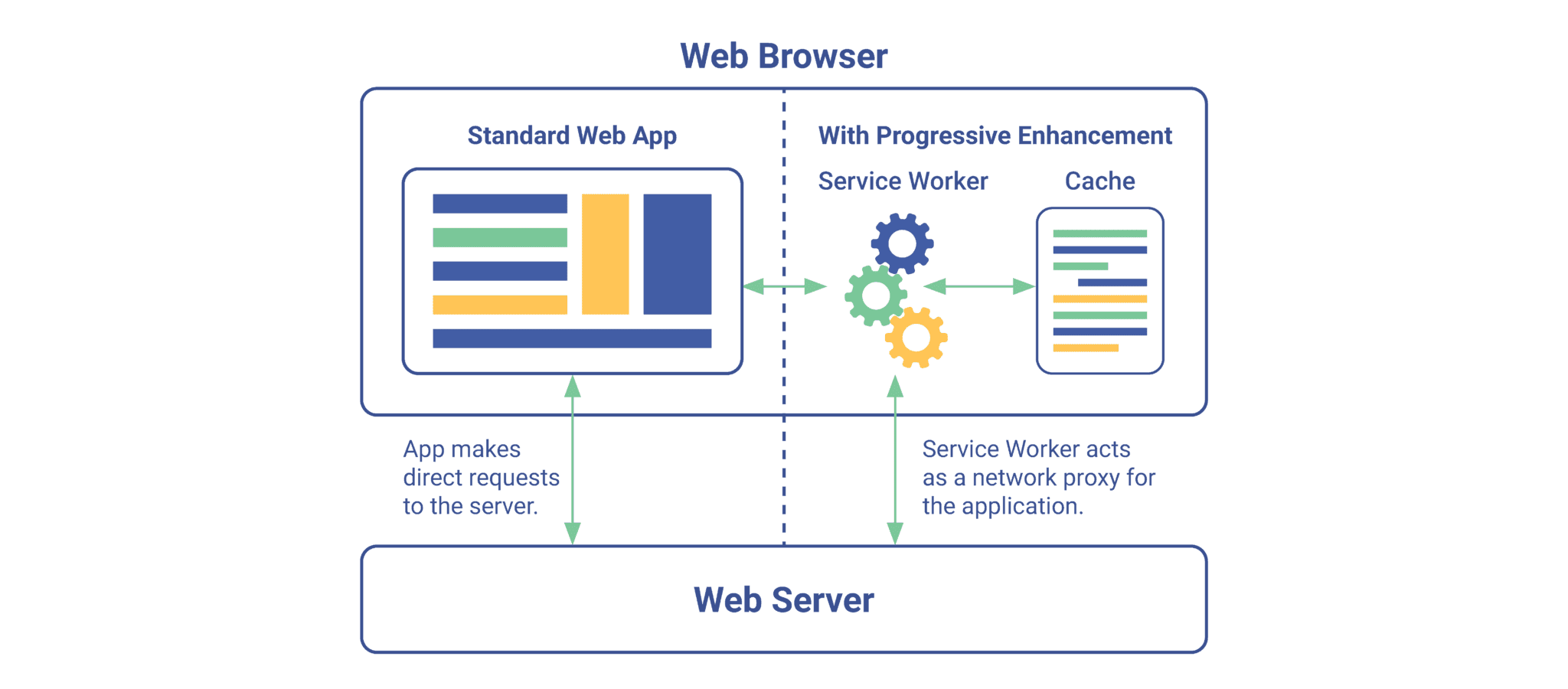
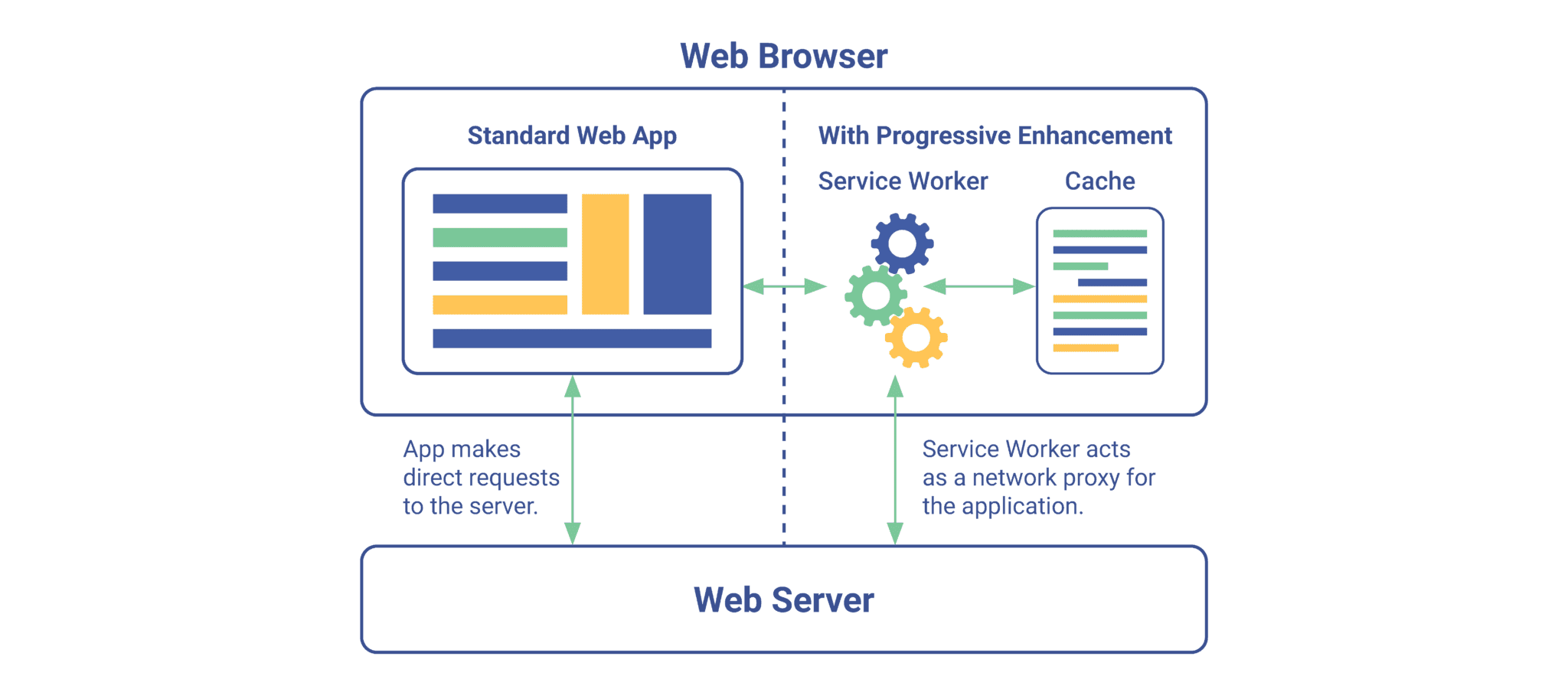
Service workers, web manifests, and caching are essential components that form the building blocks of a new category of applications known as Progressive Web Apps (PWAs). These technologies enable PWAs to offer offline capabilities, push notifications, background synchronization, and home screen installation.
Cache management plays a critical role in PWAs by allowing developers to store important assets like HTML, CSS, JavaScript files locally on the user’s device. This enables faster loading times and a seamless user experience even without an internet connection.
Background synchronization allows PWAs to sync data with servers when connectivity is regained. Manifest file optimization ensures that PWAs have an optimized display on different devices and platforms. Caching strategies help developers determine what resources should be cached and for how long.
Understanding the service worker lifecycle is crucial for effective implementation and maintenance of PWAs.
4. Mastering Progressive Web Apps: Implementation Tips for App Shell Architecture, Manifest Files, and Offline Capabilities
Understanding the implementation tips for app shell architecture, manifest files, and offline capabilities is essential for effectively mastering the development of Progressive Web Apps (PWAs).
To optimize app shell architecture, developers can employ techniques such as code splitting and lazy loading to ensure fast initial page loads.
Additionally, manifest file best practices involve providing metadata about the web application, including icons, theme colors, and display modes.
Offline capabilities can be achieved through caching strategies like service workers, which enable the storage of static assets and dynamic data for offline access.
Background sync techniques allow PWAs to synchronize data with a server even when the app is not actively being used.
5. Fetch API in Progressive Web Apps
Fetch API is a key feature in the development of Progressive Web Apps (PWAs) that allows developers to make network requests and retrieve data from servers. It provides a standardized way to fetch resources asynchronously across different browsers, making it easier for developers to build PWAs that can work offline and deliver a seamless user experience.
The Fetch API plays a crucial role in implementing various PWA functionalities such as background sync, push notifications, data pre-caching, secure communication, and native device integration. By leveraging the Fetch API, developers can efficiently handle network requests in PWAs while ensuring data consistency and security.
This powerful tool empowers developers to create dynamic and interactive web applications with offline capabilities that rival native mobile apps.
6. Designing Engaging User Experiences In Pwas: Ux Strategies And Guidelines
To create engaging user experiences in PWAs, designers can employ various UX strategies and guidelines that focus on optimizing navigation, improving content layout, enhancing visual aesthetics, and ensuring seamless interactions. These strategies include:
- Gamification techniques:
- Incorporating game-like elements such as challenges, rewards, and leaderboards to increase user engagement.
- Implementing progress tracking and achievements to motivate users.
- Interactive UI elements:
- Including interactive features like sliders, buttons with hover effects, and drag-and-drop functionality to enhance user interactivity.
- Utilizing gestures such as swiping or pinching for intuitive navigation.
- Personalization options:
- Allowing users to customize their PWA experience by selecting themes, adjusting font sizes or colors, and choosing preferred content preferences.
- Providing personalized recommendations based on user behavior and preferences.
- Animation and motion design:
- Using subtle animations to guide users’ attention and provide feedback for their actions.
- Employing smooth transitions between different screens or sections for a seamless browsing experience.
- Voice user interface:
- Integrating voice commands for hands-free interaction with the PWA.
- Offering voice-based search functionalities for quick access to desired information.
7. Offline Functionality In Progressive Web Apps: Strategies And Techniques
Offline functionality in PWAs can be achieved through the implementation of various strategies and techniques that enable users to access and interact with app content even when they are offline or experiencing limited connectivity.
Caching is a common technique used in PWAs to store app data locally, allowing it to be accessed without an internet connection. By caching key resources such as HTML files, CSS stylesheets, and JavaScript files, PWAs can provide a seamless user experience even in offline mode.
Data synchronization plays a crucial role in maintaining consistency between local and remote data sources. Through mechanisms like background sync and periodic updates, changes made by users while offline can be synchronized with the server once connectivity is restored.
Conflict resolution techniques ensure that conflicting changes made by multiple users are resolved intelligently, preventing data inconsistencies in the PWA.
Overall, these strategies and techniques empower PWAs to function effectively offline while preserving usability and data integrity.
8. Performance Optimization In Pwas: Load Times, Resource Management, And Caching Strategies
Performance optimization in PWAs involves implementing strategies to improve load times, efficiently manage resources, and utilize effective caching techniques. To achieve these goals, developers can employ various techniques such as:
- Image optimization: This technique focuses on reducing the size of images without compromising their quality. By compressing images or using formats that offer better compression algorithms (such as WebP), load times can be significantly improved.
- Resource preloading: This strategy involves loading essential resources in advance so that they are readily available when needed. By anticipating user interactions and preloading necessary assets like CSS files or JavaScript libraries, page rendering speed can be enhanced.
- Browser caching: Maximizing the utilization of browser cache helps reduce server requests and improves load times. By setting appropriate cache headers and leveraging mechanisms like etags or Last-Modified headers, repeated requests for static content can be minimized.
- Code minification: Compressing and minimizing code size is crucial for enhancing performance. Techniques like removing unnecessary whitespace characters or comments, renaming variables to shorter names, and combining multiple files into a single file can help reduce download time.
- Progressive rendering: Implementing techniques to display content as it loads improves perceived performance. By prioritizing critical content or utilizing lazy loading for non-critical elements like images or ads, users perceive faster page load times.
9. A Comprehensive Comparison: Progressive Web Apps Versus Native Apps
A comprehensive comparison between native apps and progressive web apps reveals their differences in terms of functionality, platform compatibility, and user experience.
Native apps are developed specifically for a particular platform, such as iOS or Android, providing better access to device features and offline capabilities. However, they are limited by the need for separate versions for each platform and require users to install updates manually.
On the other hand, Progressive Web Apps (PWAs) are web-based applications that can be accessed through a browser on any device with internet connectivity. They offer increased reach due to their cross-platform compatibility and do not require installation or manual updates.
Additionally, PWAs have seen steady adoption rates due to their ability to deliver engaging user experiences while offering comparable performance to native apps at a lower development cost.
10. Decoding the Debate: Progressive Web Apps vs. Native Apps
Decoding the debate between native apps and web-based applications involves understanding their differences in terms of functionality, platform compatibility, and user experience.
- Functionality:
- Native apps offer better performance due to direct access to device features and hardware.
- Progressive web apps (PWAs) have limited access to device functionalities but can still provide basic app-like functions through service workers.
- Platform Compatibility:
- Native apps are built specifically for a particular platform (e.g., iOS or Android), requiring separate development efforts.
- PWAs are platform-independent and can be accessed on any device with a compatible browser.
Both types of applications also differ in terms of user engagement and experience. - User Engagement in Native Apps: - Native apps often provide a more immersive experience with features like push notifications, offline capabilities, and seamless interactions. - Users tend to spend more time within native apps due to their optimized performance.
- User Experience in Progressive Web Apps:
- PWAs offer benefits such as instant loading, responsive design, and cross-platform accessibility.
- However, they may lack certain advanced features found in native apps.
Considering the challenges involved in native app development (e.g., multiple codebases), the benefits of progressive web apps become evident. Despite this, the choice between the two ultimately depends on specific requirements and priorities.
Advanced Use Cases And Industry Trends For Pwas
This discussion will explore advanced use cases and industry trends for Progressive Web Apps (PWAs).
It will cover topics such as building PWAs for e-commerce, including best practices and case studies.
Additionally, the offline-first approach in PWAs will be examined, focusing on how to build apps that can function effectively with low or unstable connectivity.
Furthermore, the potential of PWAs in IoT will be discussed, highlighting the ability to connect devices through web technologies.
The conversion of web apps into installable desktop apps and the bridging of the gap between web and native experiences in hybrid mobile apps will also be explored.
1. Building Pwas For E-Commerce: Best Practices And Case Studies
Implementing best practices in building progressive web apps for e-commerce can greatly enhance user experience and lead to increased sales conversion rates. To achieve optimal results, it is crucial to analyze performance and prioritize user experience in the design process.
- Case studies:
- Several case studies have demonstrated the effectiveness of implementing progressive web apps for e-commerce. Companies such as Alibaba, Flipkart, and Lancôme have reported significant improvements in conversion rates and overall user satisfaction.
- Conversion optimization:
- Progressive web apps offer numerous opportunities for conversion optimization. By providing fast loading times, push notifications, and offline capabilities, users are more likely to engage with the app and complete their purchases.
Mobile commerce: - Building a progressive web app specifically tailored for mobile devices ensures a seamless shopping experience across different screen sizes and operating systems.
User experience: - Focusing on enhancing user experience through intuitive navigation, smooth animations, and personalized content can significantly impact customer satisfaction levels.
Performance analysis: - Regularly analyzing the performance of the progressive web app using tools like Lighthouse or WebPageTest helps identify areas that require improvement to ensure optimal speed and responsiveness.
2. Offline-First Approach In Pwas: Building Apps For Low Or Unstable Connectivity
In the context of building Progressive Web Apps (PWAs), an essential consideration is ensuring optimal performance even in scenarios of low or unstable connectivity.
This offline-first approach involves implementing strategies such as low latency, network optimization, data compression, offline data sync, and connectivity fallback mechanisms.
Low latency techniques focus on reducing the time taken for communication between client and server by minimizing network round trips and optimizing resource loading.
Network optimization involves prioritizing critical resources and employing techniques like caching to enhance load times.
Data compression reduces the size of transferred data, improving efficiency and reducing bandwidth requirements.
Offline data sync allows users to continue interacting with the app even when offline, enabling seamless updates once a stable connection is restored.
Connectivity fallback ensures that if a user experiences poor or no connectivity, alternative content or functionality is provided to maintain engagement.
Adopting these approaches in PWA development contributes to delivering robust user experiences across various network conditions.
3. Progressive Web Apps In Iot: Connecting Devices Through Web Technologies
Connecting devices through web technologies in the context of IoT involves establishing seamless communication and interoperability between various smart devices, enabling efficient data exchange and integration for enhanced functionality and automation. This integration is facilitated by the use of web technologies that provide a standardized framework for device communication and connectivity.
Key aspects of connecting devices in IoT include:
- Protocol standardization:
- Establishing common protocols enables different devices to communicate effectively, regardless of their underlying technology or manufacturer.
- Standardization ensures compatibility and interoperability between devices from diverse vendors.
- Data synchronization:
- Web technologies enable real-time data synchronization between connected devices, ensuring that information remains up-to-date across multiple platforms.
- Synchronized data allows for accurate decision-making and seamless user experiences.
4. Pwas And Desktop Applications: Converting Web Apps Into Installable Desktop Apps
Converting web applications into installable desktop applications allows for enhanced user accessibility and convenience by providing a seamless transition between web-based and desktop environments. This process involves converting the existing web app into a format that can be installed and run on a desktop operating system, such as Windows or macOS.
There are several benefits to developing desktop applications from web apps. Firstly, desktop apps have access to system resources, enabling them to offer better performance and offline capabilities. Additionally, they can provide a more immersive user experience with features like notifications and integration with other desktop applications.
However, there are challenges in the conversion process, such as ensuring compatibility across different operating systems and managing updates. To overcome these challenges, best practices for desktop app development include using cross-platform frameworks and thoroughly testing the application on different devices and operating systems.
Overall, converting web apps into installable desktop apps offers improved user experience and expands the reach of the application beyond traditional web browsers.
5. Pwas And Hybrid Mobile Apps: Bridging The Gap Between Web And Native Experiences
Hybrid mobile apps serve as a bridge between web and native experiences, allowing developers to leverage the advantages of both platforms while providing users with a seamless and integrated application.
In hybrid app development, web to native migration is facilitated through the use of bridging technologies that enable the incorporation of web technologies into native environments. This approach offers several benefits, including cross platform compatibility, as hybrid apps can be developed once and deployed across multiple platforms such as iOS and Android.
Additionally, hybrid apps offer improved app performance compared to pure web applications by utilizing device-specific features and accessing native APIs. However, it is important for developers to carefully consider the trade-offs between web-based and native functionalities during development in order to achieve optimal results in terms of user experience and overall performance.
6. Pwas In Healthcare: Streamlining Patient Care And Data Accessibility
PWA implementation in healthcare facilitates streamlined patient care and enhances accessibility to medical data. The integration of PWA technology in healthcare systems allows for the secure transmission and storage of sensitive patient information, addressing concerns regarding data security.
Telemedicine applications powered by PWAs enable remote consultations and virtual visits between patients and healthcare providers, promoting access to care in remote or underserved areas. Additionally, PWAs support remote patient monitoring, enabling real-time collection and analysis of vital signs and health-related data outside traditional clinical settings. This functionality enhances the ability of healthcare professionals to monitor patients’ conditions remotely and intervene when necessary, ultimately improving patient outcomes.
Furthermore, PWAs can also be used to efficiently manage electronic health records (EHRs), making them easily accessible for authorized personnel while maintaining strict privacy measures. Incorporating PWAs into healthcare systems enables the utilization of advanced analytics tools that can help identify trends, patterns, and insights from large-scale health data sets, fostering evidence-based decision-making processes in the field of healthcare analytics.
7. Pwas In The Gaming Industry: Creating Immersive Web-Based Experiences
The integration of web-based technologies in the gaming industry has revolutionized the way players engage with games, offering immersive experiences and expanding accessibility to a wider audience.
This has led to the creation of interactive narratives that allow players to actively participate in shaping the outcome of the game.
Additionally, gamifying education has become a popular approach, where educational content is incorporated into games to make learning more engaging and enjoyable for students.
The incorporation of virtual reality technology has further enhanced the immersive experience by providing a sense of presence within the virtual world.
Multiplayer gaming experiences have also been greatly enhanced through web-based technologies, allowing players from different locations to connect and compete or cooperate in real-time.
8. Voice-Enabled Pwas: Exploring Speech Recognition And Synthesis In Web Apps
One aspect of voice-enabled PWAs that has gained attention is the exploration of speech recognition and synthesis technologies in web applications. Speech recognition challenges arise due to variations in pronunciation, accents, background noise, and vocabulary diversity. To overcome these challenges, natural language processing techniques are employed to enhance accuracy and improve user experience.
Voice assistants in web apps provide users with a hands-free and efficient interaction method. Voice user interface design plays a crucial role in creating intuitive and user-friendly interfaces for voice-enabled PWAs. Implementing speech synthesis allows web apps to generate human-like speech output, enhancing the overall user experience.
Advanced Techniques for Progressive Web Apps (PWAs)
This discussion will focus on several advanced techniques for Progressive Web Apps (PWAs).
These techniques include:
- Advanced Service Worker Techniques such as Background Sync, Push Notifications, and Data Pre-caching.
Additionally, the discussion will cover Offline Support in PWAs, including:
- Caching Strategies and Data Synchronization.
Furthermore, the enhancement of user experience through Background Sync and the implementation of Push Notifications for real-time communication in PWAs will be explored.
Lastly, the importance of secure communication in PWAs will be addressed by examining the implementation of:
- HTTPS
- SSL Certificates
- Content Security Policies.
Advanced Service Worker Techniques: Background Sync, Push Notifications, and Data Pre-caching
Background Sync, push notifications, and data pre-caching are advanced service worker techniques commonly employed in progressive web apps. These techniques play a crucial role in optimizing offline functionality and improving the overall user experience with background sync.
- Background Sync Techniques:
- Implementing event-driven synchronization mechanisms.
- Utilizing periodic syncing to ensure data consistency.
- Push Notification Strategies:
- Employing push APIs to send real-time notifications to users.
- Leveraging Service Worker’s ability to handle incoming push messages.
- Data Pre-caching Methods:
- Caching essential assets during the installation phase.
- Using strategies like cache-first or network-first for efficient resource retrieval.
Offline Support in PWAs: Caching Strategies and Data Synchronization
In the context of Progressive Web Apps (PWAs), offline support is a crucial aspect that enhances user experience and ensures uninterrupted functionality even in the absence of an internet connection. This subtopic focuses on caching strategies and data synchronization techniques employed in PWAs to achieve offline support.
Caching optimization plays a vital role by storing frequently accessed resources locally, reducing network requests, and improving app performance. Data synchronization enables seamless integration between client-side and server-side data, ensuring consistency across multiple devices. Conflict resolution strategies ensure that conflicting updates made in offline mode are resolved appropriately when syncing with the server. Real-time data updates further enhance offline capabilities by enabling immediate updates upon reestablishing an internet connection.
Offline first architecture promotes designing PWAs with offline usage as the primary consideration, providing a smooth user experience regardless of connectivity status.
Enhancing User Experience with Background Sync in PWAs
Background sync in PWAs plays a crucial role in enhancing the user experience by allowing data synchronization between client-side and server-side even when the application is not actively running. This feature enables several benefits, including improved data consistency, optimized performance through background tasks, real-time updates, offline form submissions, and maximized data retrieval speed with caching.
- Data synchronization: Background sync ensures that the data on the client-side remains consistent with the server-side even when the PWA is offline or experiencing connectivity issues.
- Background tasks: By enabling background processing, PWAs can perform resource-intensive tasks without affecting the user experience. This allows for smoother app usage and faster response times.
- Real-time updates: With background sync, PWAs can implement live data updates by periodically synchronizing with the server to receive real-time information.
- Offline forms: Background sync enables PWA users to submit forms even in offline mode. The submitted data is stored locally and automatically synchronized once a network connection becomes available.
- Data caching: By utilizing caching mechanisms, PWAs can store frequently accessed data locally. This maximizes retrieval speed and reduces network requests, resulting in improved performance and reduced latency.
Push Notifications in PWAs: Implementing Real-Time Communication
Push notifications in PWAs enable real-time communication by allowing the application to send timely updates and alerts to users, even when they are not actively using the app. This feature is particularly valuable for implementing real-time chat functionality in PWAs.
To achieve this, push notification strategies can be employed, such as implementing websockets or optimizing server-sent events (SSE). Websockets provide a bidirectional communication channel between the client and server, facilitating instant updates.
SSE, on the other hand, allows one-way communication from the server to the client, making it suitable for scenarios where real-time updates are needed but bidirectional communication is not required.
Additionally, integrating WebRTC (Web Real-Time Communication) technology further enhances real-time communication capabilities in PWAs by enabling peer-to-peer audio and video communication directly within the app.
Secure Communication in PWAs: Implementing HTTPS, SSL Certificates, and Content Security Policies
Implementing HTTPS, SSL certificates, and content security policies are essential measures for ensuring secure communication in PWAs. These measures allow for the secure transmission of data between the client and the server, protecting sensitive information from unauthorized access or interception.
To ensure secure communication in PWAs, the following practices should be implemented:
- HTTPS implementation:
- Obtain a valid SSL certificate from a trusted certificate authority.
- Configure the web server to use HTTPS by enabling SSL/TLS protocols.
- SSL certificate management:
- Regularly update and renew SSL certificates to maintain their validity.
- Monitor certificate expiration dates to prevent service interruptions.
- Content Security Policy configuration:
- Implement strict content security policies to mitigate risks associated with cross-site scripting (XSS) attacks.
- Define policies that restrict the sources of content that can be loaded on a web page.
Integrating Native Device Features in PWAs: Camera, Geolocation, and Device APIs
In the context of Progressive Web Apps (PWAs), integrating native device features such as camera, geolocation, and device APIs can greatly enhance user experience and functionality.
Camera integration allows PWAs to leverage the device’s camera for various purposes like capturing photos or scanning QR codes.
Geolocation implementation enables PWAs to access the user’s current location, enabling personalized services based on location data.
Device API usage empowers PWAs to utilize a wide range of functionalities provided by the device hardware and software.
By leveraging these native features, PWAs can provide more immersive and engaging experiences similar to native applications.
However, it is important to consider PWA device capabilities when implementing these features to ensure compatibility across different devices and operating systems while maintaining a consistent user experience.
Accessibility in Progressive Web Apps: Techniques for Building Inclusive Web Experiences
Accessibility considerations are crucial in the development of inclusive web experiences for Progressive Web Apps. By implementing accessible design techniques, developers can ensure that their PWAs are usable by individuals with disabilities. Some important factors to consider include screen reader compatibility, color contrast, keyboard navigation, and alternative text for images.
- Screen reader compatibility:
- Use semantic HTML markup to provide meaningful information to screen readers.
- Ensure that all interactive elements are properly labeled and can be accessed using assistive technologies.
- Color contrast:
- Choose color combinations that meet WCAG (Web Content Accessibility Guidelines) standards for sufficient contrast.
- Provide alternative means of conveying information, such as using icons or patterns in addition to color.
- Keyboard navigation:
- Ensure that all functionality can be accessed and operated through a keyboard alone.
- Clearly indicate focus states for easy navigation and interaction.
- Alternative text:
- Provide descriptive alt text for images to convey their content to visually impaired users.
- Avoid using generic phrases like ‘image’ or ‘picture’ as alt text; instead, describe the purpose or context of the image.
Progressive Web App SEO: Optimizing PWAs for Search Engine Visibility
To optimize the visibility of Progressive Web Apps (PWAs) on search engines, developers can employ various SEO techniques that focus on improving the discoverability and ranking of these web applications.
PWA SEO is crucial for increasing organic traffic and attracting users to PWAs.
One of the key strategies for optimizing search engine visibility is to ensure that the PWA is crawlable by search engine bots. This involves utilizing proper meta tags, implementing canonical URLs, and providing a sitemap.
Additionally, developers should focus on optimizing page speed, as this is an important ranking factor for search engines. Leveraging responsive design principles and compressing images are effective ways to improve page speed.
Finally, incorporating relevant keywords in the title tags, meta descriptions, headings, and content can significantly enhance search rankings for PWAs.
Performance Optimization in Progressive Web Apps (PWAs)
This discussion aims to explore various performance optimization techniques in Progressive Web Apps (PWAs).
The first key point is a deep dive into caching strategies for PWAs. This includes examining the Cache Storage API, cache invalidation, and versioning.
The second key point focuses on efficient resource loading techniques. This includes lazy loading, code splitting, and preloading to enhance PWA performance.
Lastly, the discussion delves into progressive web app performance monitoring and debugging tools and techniques. This includes optimizing network requests by minimizing round trips, compression, and data streaming methods. It also covers performance testing and benchmarking tools, metrics, and best practices.
Deep Dive into Caching Strategies for PWAs: Cache Storage API, Cache Invalidation, and Versioning
The deep dive into caching strategies for Progressive Web Apps explores the utilization of the Cache Storage API, cache invalidation techniques, and versioning methods.
- Cache management
- Cache expiration
- Setting appropriate expiration times for cached resources to ensure they are refreshed when necessary.
- Implementing cache-control headers and max-age directives to control the lifespan of cached data.
- Cache strategies
- Employing different caching strategies such as network-first, cache-first, and stale-while-revalidate to optimize resource retrieval based on availability and freshness.
- Utilizing service workers to intercept network requests and serve responses from the cache when available.
- Cache performance
- Monitoring cache hit rates and miss rates to evaluate the effectiveness of caching strategies.
- Analyzing response times for cached resources to identify potential bottlenecks in cache performance.
- Cache optimization
- Implementing intelligent cache invalidation mechanisms based on changes in resource versions or dependencies.
- Compressing cached resources using gzip or brotli compression algorithms to reduce storage requirements and improve transfer speeds.
These caching strategies aim to improve overall performance, reduce network dependency, enhance user experience, and enable offline functionality in Progressive Web Apps.
Efficient Resource Loading in PWAs: Lazy Loading, Code Splitting, and Preloading Techniques
In order to enhance the performance of Progressive Web Apps (PWAs), efficient resource loading is crucial. This subtopic explores various techniques that can be employed for this purpose, including lazy loading, code splitting, and preloading strategies.
Lazy loading allows for the deferred loading of resources until they are actually needed by the user, thus reducing initial load times and improving overall page speed.
Code splitting involves breaking down a large JavaScript bundle into smaller chunks, which can be loaded on demand based on user interactions or other criteria.
Preloading strategies prioritize the fetching of critical resources in advance so that they are readily available when needed.
To achieve efficient resource loading in PWAs, developers should consider implementing these techniques alongside other resource optimization tips and best practices. By doing so, PWAs can deliver faster and smoother experiences to users while minimizing unnecessary network requests and optimizing resource utilization.
Progressive Web App Performance Monitoring and Debugging: Tools and Techniques
Performance monitoring and debugging of PWAs can be effectively accomplished by utilizing a range of tools and techniques available in the field. To ensure optimal performance, developers need to employ various strategies for performance monitoring and debugging. Here are some key techniques and tools that can aid in this process:
- Performance Monitoring Techniques:
- Real User Monitoring (RUM): This technique involves collecting data from actual users to identify performance bottlenecks.
- Synthetic Monitoring: It involves simulating user interactions to measure PWA performance under different conditions.
- Debugging Tools and Frameworks:
- Chrome DevTools: This powerful tool provides a wide array of features for debugging and profiling PWAs.
- Lighthouse: A useful auditing tool that assesses the overall quality and performance of PWAs.
By employing these techniques along with appropriate tooling and frameworks, developers can effectively monitor, debug, optimize the performance of their PWAs.
Additionally, conducting regular performance testing and benchmarking further ensures continuous improvement in PWA performance.
Optimizing Network Requests in PWAs: Minimizing Round Trips, Compression, and Data Streaming
In order to enhance the performance of Progressive Web Apps (PWAs), optimizing network requests is crucial. Minimizing latency and reducing round trips are key aspects of network optimization in PWAs.
This can be achieved through various techniques such as data compression and streamlining data transfer. Data compression techniques involve reducing the size of data being transferred, thereby minimizing the time required for transmission.
Streamlining data transfer involves efficiently organizing and structuring the data to minimize unnecessary round trips between the client and server.
These optimizations not only improve the overall user experience by decreasing load times but also conserve bandwidth usage, particularly important for users with limited internet connectivity or data plans.
Performance Testing and Benchmarking for PWAs: Tools, Metrics, and Best Practices
To accurately assess the performance of PWAs, it is essential to conduct comprehensive testing and benchmarking using appropriate tools, metrics, and best practices.
Performance testing allows developers to evaluate the responsiveness and stability of a PWA under various conditions, such as high user loads or limited network bandwidth. Load testing is a crucial component of performance testing that simulates real-world usage scenarios by subjecting the application to heavy traffic. This helps identify any bottlenecks or areas for improvement in terms of scalability and response times.
Performance benchmarking involves comparing the performance metrics of a PWA against industry standards or similar applications to obtain insights into its relative efficiency.
To facilitate these evaluations, several performance testing tools are available that provide features like load generation, monitoring, profiling, and analysis.
Adhering to performance best practices ensures that PWAs deliver optimal user experiences by optimizing resource utilization, minimizing network requests and latency, implementing caching strategies effectively, and optimizing code execution.
Tooling and Frameworks for PWAs
This discussion will focus on exploring PWA frameworks, specifically comparing React, Angular, and Vue.js.
It will also cover PWA development with Workbox, which harnesses the power of service worker toolkits.
Additionally, strategies and tools for testing PWAs to ensure quality assurance will be examined.
The discussion will then move on to automated deployment of PWAs using continuous integration and delivery pipelines.
Exploring PWA Frameworks: Comparing React, Angular, and Vue.js
Comparing React, Angular, and Vue.js as PWA frameworks provides insights into their respective features and capabilities. Each framework offers its unique advantages and considerations for building progressive web apps (PWAs).
Comparing PWA frameworks:
- Performance and Efficiency:
- React:
- Virtual DOM ensures efficient updates.
- Fine-grained control over components optimizes rendering.
- Angular:
- Ahead-of-Time (AOT) compilation enhances performance.
- Built-in optimizations like lazy loading improve efficiency.
- js:
- Lightweight framework with fast rendering speed.
- Reactive data binding minimizes unnecessary re-renders.
- Developer Experience:
- React:
- Large community support and extensive library ecosystem.
- Declarative syntax simplifies code maintenance.
- Angular:
- Comprehensive documentation and integrated tooling.
- TypeScript support enables robust development experience.
- js:
- Easy learning curve for beginners with intuitive syntax.
- Flexible integration options with existing projects.
Considering these aspects can help developers make informed decisions when choosing a PWA framework.
PWA Development with Workbox: Harnessing the Power of Service Worker Toolkits
In the context of Progressive Web App (PWA) development, service worker optimization plays a crucial role in ensuring efficient performance and offline functionality.
Workbox, a popular service worker toolkit developed by Google, offers a robust set of tools and libraries that simplify the implementation and management of service workers.
By utilizing workbox configuration, developers can easily integrate various service worker caching techniques to optimize the delivery of web content. These techniques include precaching essential assets during installation, runtime caching for dynamic resources, and stale-while-revalidate strategy for fetching updates in real-time.
With careful consideration of workbox best practices, such as managing cache size and expiration policies, developers can significantly improve service worker performance and enhance user experience in PWAs.
Overall, Workbox provides an effective solution for implementing advanced service worker functionalities in PWA development projects.
Testing PWAs: Strategies and Tools for Ensuring Quality Assurance
Testing strategies and tools are essential for ensuring the quality assurance of PWAs. To ensure that a progressive web app (PWA) functions as intended, various testing approaches can be employed. These include:
- Automated Testing:
- Unit tests: This type of testing focuses on individual units or components of the PWA to ensure their proper functionality.
- Integration tests: These tests check how different modules or components work together in the PWA.
- Performance Monitoring:
- Load testing: By subjecting the PWA to simulated high traffic scenarios, load testing helps identify potential bottlenecks and assess its performance under heavy loads.
- Regression Testing:
- This form of testing verifies that new changes or updates made to the PWA have not introduced any unintended defects or issues.
- Usability Testing:
- User experience (UX) research techniques are used to evaluate how users interact with the PWA and identify areas for improvement in terms of usability and user satisfaction.
Automated Deployment of PWAs: Continuous Integration and Delivery Pipelines
Automated deployment of PWAs can be achieved through the implementation of continuous integration and delivery pipelines.
Continuous integration refers to the practice of regularly merging code changes into a central repository, ensuring that all developers are working with the latest version.
Delivery pipelines further automate this process by automating tasks such as building, testing, and deploying software.
Automated testing plays a crucial role in ensuring the quality of PWAs during deployment. By automatically running tests on each code change, developers can quickly identify and fix any issues before they reach production.
Deployment automation streamlines the process by automatically deploying new versions of the PWA to various environments, reducing manual effort and minimizing human error.
Version control is essential for managing different versions of the PWA codebase and tracking changes over time.
Debugging Techniques for PWAs: Troubleshooting Common Issues
Debugging techniques are vital for troubleshooting common issues in PWAs, as they help developers identify and resolve errors that may occur during the development and deployment processes.
To effectively debug PWAs, developers can employ various techniques:
- Troubleshooting service workers:
- Inspecting registration and activation processes
- Checking for any errors in the fetch event handlers
- Debugging caching issues:
- Examining cache storage to ensure correct data is being cached
- Verifying cache control headers and response headers
- Network request debugging:
- Monitoring network requests using browser developer tools or external tools like Charles Proxy
- Analyzing request and response headers for any anomalies or errors
- Debugging offline functionality:
- Simulating offline mode to test PWA behavior without an internet connection
- Reviewing code related to offline caching and handling of offline events
- Troubleshooting push notifications:
- Inspecting subscription status and permission settings
- Verifying server-side implementation of push notification services.
PWAs and Backend Integration
This discussion focuses on the integration of backend frameworks with Progressive Web Apps (PWAs). Specifically, it explores options such as Node.js, Django, and Ruby on Rails.
It also delves into the implementation of authentication and authorization in PWAs. This section highlights the importance of user management and access control.
Additionally, the discussion examines real-time communication in PWAs. It covers technologies like WebSockets, Server-Sent Events, and WebRTC.
The topic further covers data synchronization strategies in PWAs. It emphasizes offline-first approaches and conflict resolution.
Lastly, the discussion explores the relationship between PWAs and microservices. It discusses design patterns and scalability considerations within this context.
Building Progressive Web Apps with Backend Frameworks: Node.js, Django, or Ruby on Rails
When building Progressive Web Apps, developers often turn to backend frameworks such as Node.js, Django, or Ruby on Rails. Each framework has its own advantages and considerations when it comes to building progressive web apps.
- js vs Django:
- js is a JavaScript runtime that allows developers to build scalable and high-performance web applications. It is known for its event-driven architecture and non-blocking I/O model, making it suitable for real-time applications.
- Django, on the other hand, is a Python-based framework that follows the Model-View-Controller (MVC) architectural pattern. It provides a robust set of tools and libraries for rapid development and scalability.
- Comparing Ruby on Rails and Node.js:
- Ruby on Rails is a popular web application framework written in Ruby that emphasizes convention over configuration. It offers a streamlined development process with built-in features such as routing, ORM (Object Relational Mapping), and MVC structure.
- js, being a JavaScript runtime, allows developers to use the same language throughout the entire stack. This can lead to increased productivity and easier code sharing between frontend and backend teams.
Choosing the right backend framework for your progressive web app depends on various factors such as the project’s requirements, team expertise, performance needs, scalability goals, and time-to-market considerations. Evaluating these factors will help in making an informed decision about which backend framework best suits your progressive web app development needs.
Authentication and Authorization in PWAs: Implementing User Management and Access Control
In the context of building Progressive Web Apps (PWAs), authentication and authorization play a crucial role in ensuring secure access to user data and functionality. User authentication is the process of verifying the identity of users, while authorization involves granting or denying access rights based on predefined roles or permissions.
Implementing user management and access control in PWAs typically involves techniques such as role-based access control (RBAC), password encryption, multi-factor authentication (MFA), and session management.
RBAC allows administrators to assign specific roles to users, which determine their level of access within the application. Password encryption ensures that sensitive user information remains protected even if it is compromised. MFA adds an extra layer of security by requiring users to provide multiple forms of identification before accessing their accounts. Session management helps maintain user sessions securely throughout their interactions with the PWA.
Real-time Communication in PWAs: WebSockets, Server-Sent Events, and WebRTC
Real-time communication in PWAs involves the utilization of WebSockets, Server-Sent Events, and WebRTC to enable seamless and efficient data exchange between the client-side application and the server. These technologies offer different approaches for achieving real-time communication.
- WebSocket vs Server-Sent Events:
- WebSocket is a full-duplex communication protocol that provides bidirectional communication channels between the client and server. It allows real-time data transfer, enabling instant updates.
- Server-Sent Events (SSE) is a unidirectional protocol where data flows from the server to the client. It provides a simple way to push updates from the server to the client without requiring any additional requests.
The choice between WebSocket and SSE depends on specific requirements such as support for bidirectional or unidirectional communication, scalability needs, and browser compatibility.
Implementing real-time messaging in PWAs requires integrating these technologies into the application architecture. This involves setting up appropriate event listeners, establishing connections with servers or peers, handling incoming and outgoing messages efficiently.
Challenges in real-time communication include managing connection stability across different network conditions, handling large-scale deployments with high user concurrency, ensuring security measures against potential threats like unauthorized access or data breaches.
Data Synchronization in PWAs: Offline-First Strategies and Conflict Resolution
Data synchronization in PWAs involves the implementation of offline-first strategies and conflict resolution techniques to ensure seamless and accurate data exchange between the client-side application and the server.
Offline first strategies prioritize the functionality of an application even when there is no network connection, allowing users to continue working with locally cached data. This approach poses challenges in terms of data synchronization when the device reconnects to the internet.
Conflict resolution techniques are employed to handle conflicting data changes that may occur during offline usage or simultaneous updates on different devices. These techniques aim to resolve conflicts by merging or discarding conflicting changes while preserving data integrity.
Effective offline data management is crucial for PWAs as it enables uninterrupted user experiences, enhances productivity, and mitigates potential issues arising from unreliable network connections.
PWAs and Microservices: Design Patterns and Scalability Considerations
When considering the design patterns and scalability considerations for PWAs and microservices, it is essential to analyze the architectural choices and their potential impact on performance, maintenance, and overall system efficiency.
- Microservices scalability:
- Horizontal scaling: The ability to add more instances of a microservice to handle increased workload.
- Vertical scaling: Increasing the resources allocated to a single instance of a microservice.
- Distributed microservices:
- Service discovery: Mechanisms for locating and communicating with different microservices in a distributed environment.
- Event-driven architecture: A communication pattern where services produce and consume events asynchronously.
Load balancing strategies play a crucial role in ensuring that microservices can handle varying levels of traffic efficiently. Containerization in microservices allows for easy deployment, scaling, isolation, and management of individual components. Fault tolerance in microservices involves designing systems that can continue operating despite failures or errors occurring within individual services.
PWAs and Cross-Platform Development
This discussion will explore various aspects of cross-platform development for Progressive Web Apps (PWAs).
It will delve into the use of popular cross-platform frameworks such as React Native, Flutter, and Xamarin for building PWAs.
Additionally, the discussion will cover strategies and tools for creating offline-first cross-platform apps with PWAs.
It will also compare the pros and cons of PWA development against native app development, taking into consideration different use cases.
Moreover, this discussion will explore the conversion of web apps into installable desktop apps using PWAs.
It will examine how PWAs bridge the gap between web and native experiences in hybrid mobile app development.
Cross-Platform Frameworks for PWAs: React Native, Flutter, and Xamarin
One of the key considerations when developing Progressive Web Apps (PWAs) is selecting a suitable cross-platform framework such as React Native, Flutter, or Xamarin. These frameworks offer developers the ability to build applications that can run on multiple platforms with a single codebase.
When comparing Flutter and React Native, both frameworks have gained popularity in recent years for their ability to deliver native-like performance and user experience. However, some developers argue that Flutter provides better performance and faster development compared to React Native.
On the other hand, Xamarin is another cross-platform framework that allows developers to build PWAs using C# language. While Xamarin offers excellent integration with Microsoft technologies and a large community support, it may not be as popular or widely adopted as Flutter or React Native.
Pros of Cross-Platform Frameworks: - Code reusability across multiple platforms - Faster development time - Cost-effective solution
Cons of Cross-Platform Frameworks: - Limited access to platform-specific features - Performance issues compared to native apps
Performance Comparison of Cross-Platform Frameworks: 1. Flutter vs React Native: - Flutter offers better performance and faster development. - React Native has a larger community and more mature ecosystem.
Xamarin vs Flutter:
- Xamarin has good integration with Microsoft technologies.
- Flutter is gaining popularity due to its superior performance.
Overall, choosing the right cross-platform framework depends on factors like project requirements, developer expertise, and target audience preferences.
Creating Offline-First Cross-Platform Apps with PWAs: Strategies and Tools
To create cross-platform apps that prioritize offline functionality, developers can employ various strategies and utilize tools specifically designed for this purpose.
Offline-first strategies are essential in ensuring app usability even in low connectivity scenarios.
Cross-platform compatibility allows for the development of apps that can run on multiple operating systems, increasing accessibility.
Caching techniques play a crucial role in storing data locally on the device, reducing dependency on internet connectivity.
Data synchronization enables seamless integration between offline and online data sources, ensuring consistency across platforms.
Low connectivity solutions help handle situations where network availability is limited or unreliable by providing mechanisms such as queuing and retrying failed requests.
PWA vs. Native App Development: Pros, Cons, and Use Case Considerations
PWA and native app development each have their own advantages, disadvantages, and considerations that need to be taken into account when deciding which approach to choose for a particular use case.
- Security considerations in PWA development:
- Limited access to device features reduces potential attack vectors.
- HTTPS usage ensures secure data transmission.
- Performance comparison between PWA and native apps:
- Native apps generally provide better performance due to direct access to device hardware.
- PWAs can achieve comparable performance through caching mechanisms.
- Use cases for PWA in the education sector:
- Offline capabilities enable access to educational content without an internet connection.
- Cross-platform compatibility allows seamless access across various devices.
- PWA vs. native apps: considerations for app monetization:
- PWAs may face challenges with implementing in-app purchases or subscription models.
- Native apps offer more robust monetization options through app stores.
- Accessibility challenges and solutions in PWA development:
- Limited support for assistive technologies poses accessibility challenges.
- Implementation of ARIA attributes and focus management improves accessibility in PWAs.
PWAs and Desktop Applications: Converting Web Apps into Installable Desktop Apps
Desktop applications can be created by converting existing web apps into installable versions, allowing users to access the application directly from their desktops without the need for a browser. Converting strategies involve modifying the web app’s structure and functionality to ensure compatibility with desktop platforms. Compatibility challenges may arise due to differences in programming languages, APIs, and user interface elements between web and desktop environments.
The user experience of a converted desktop application should aim to provide seamless integration with the operating system’s native features and capabilities. This includes enabling features such as notifications, offline access, and file system integration.
The installation process involves packaging the web app into an executable file that can be installed on various operating systems, simplifying the distribution and installation of the application for end-users.
PWAs and Hybrid Mobile Apps: Bridging the Gap between Web and Native Experiences
Bridging the gap between web and native experiences, the development of hybrid mobile apps combines the advantages of both platforms to deliver a seamless user experience. Hybrid app development offers a way to transition from web to native by integrating web app functionalities with native app features. This integration allows developers to leverage their existing web codebase while also taking advantage of the device-specific capabilities provided by native frameworks.
Key aspects of hybrid app development include:
- Bridging web and mobile:
- Allows for the use of common programming languages such as HTML, CSS, and JavaScript across different platforms.
- Provides access to device features through plugins or APIs, enabling integration with hardware components like camera or GPS.
- Web app integration:
- Enables seamless incorporation of existing web applications into a mobile context.
- Offers opportunities for cross-platform compatibility and consistent user experience.
Overall, hybrid mobile apps offer a versatile solution for bridging the gap between web and native experiences while maintaining efficiency in development and delivering engaging user experiences.
Conclusion
The ultimate guide to progressive web apps provides a comprehensive overview of PWAs, including their introduction, advanced use cases and industry trends, techniques for development and performance optimization, as well as tooling and frameworks available.
The article also covers the integration of PWAs with backend systems and their compatibility with cross-platform development.
Overall, this guide offers valuable insights into the world of PWAs, empowering developers to create innovative and user-friendly web applications.
In conclusion, exploring the realm of progressive web apps opens doors to a new horizon where technology seamlessly intertwines with user experience, painting a vivid picture of limitless possibilities.
Related Reading
- Getting Started With Progressive Web Apps (Pwas) (Parent Topic)
- Advanced Techniques for Progressive Web Apps (PWAs)
- Performance Optimization in Progressive Web Apps (PWAs)
Planning a Progressive Web App?
We've built PWAs with offline sync, push notifications, and native device integration — and we know the platform limits before they surprise you.
Architecture, implementation, and performance tuning.
Discuss your PWAA technical conversation, not a sales pitch.