
Build a CMS with Microservices-Based Architecture
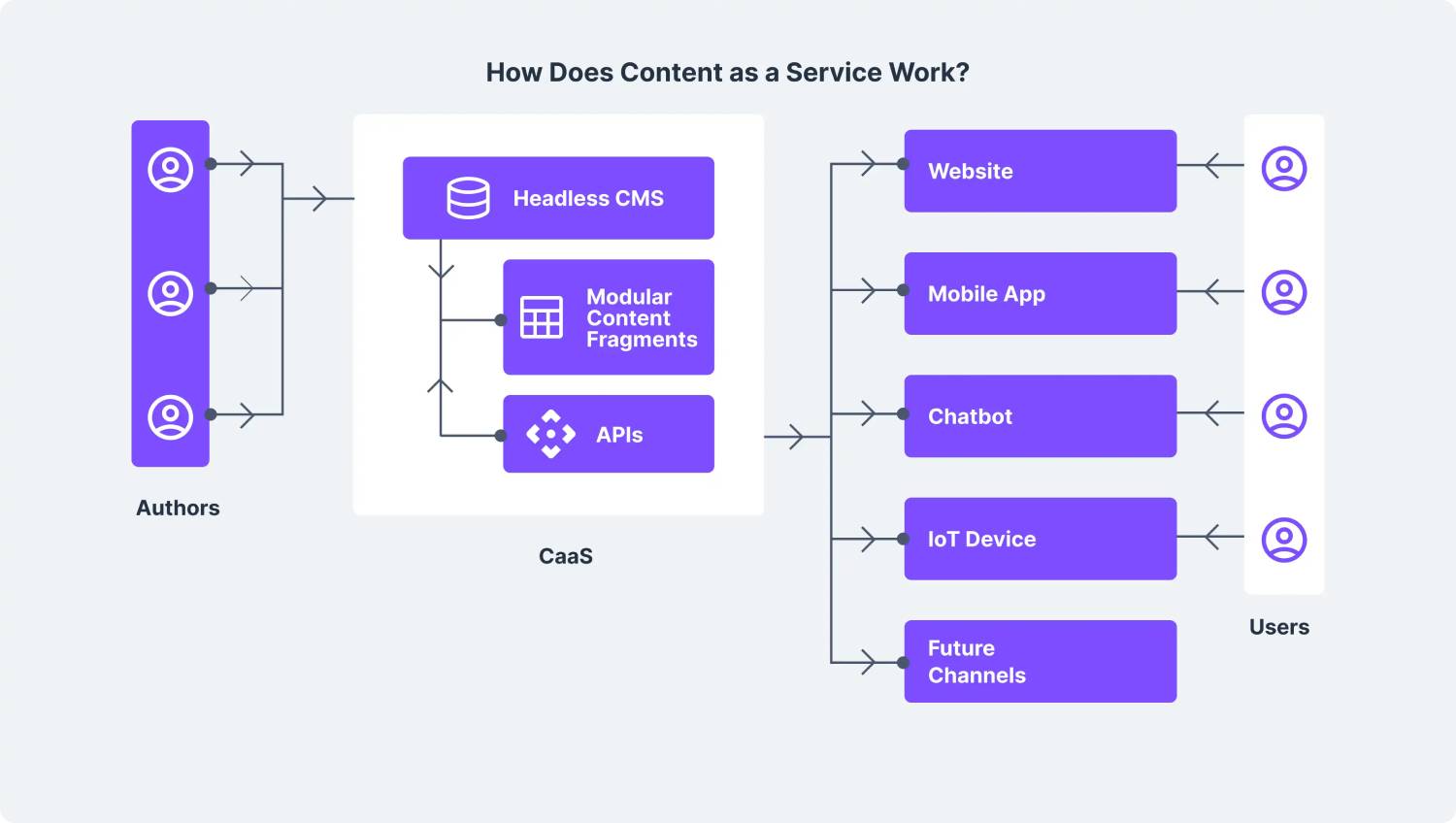
Microservices-Based CMS Architecture
Introduction to Microservices-Based CMS Architecture
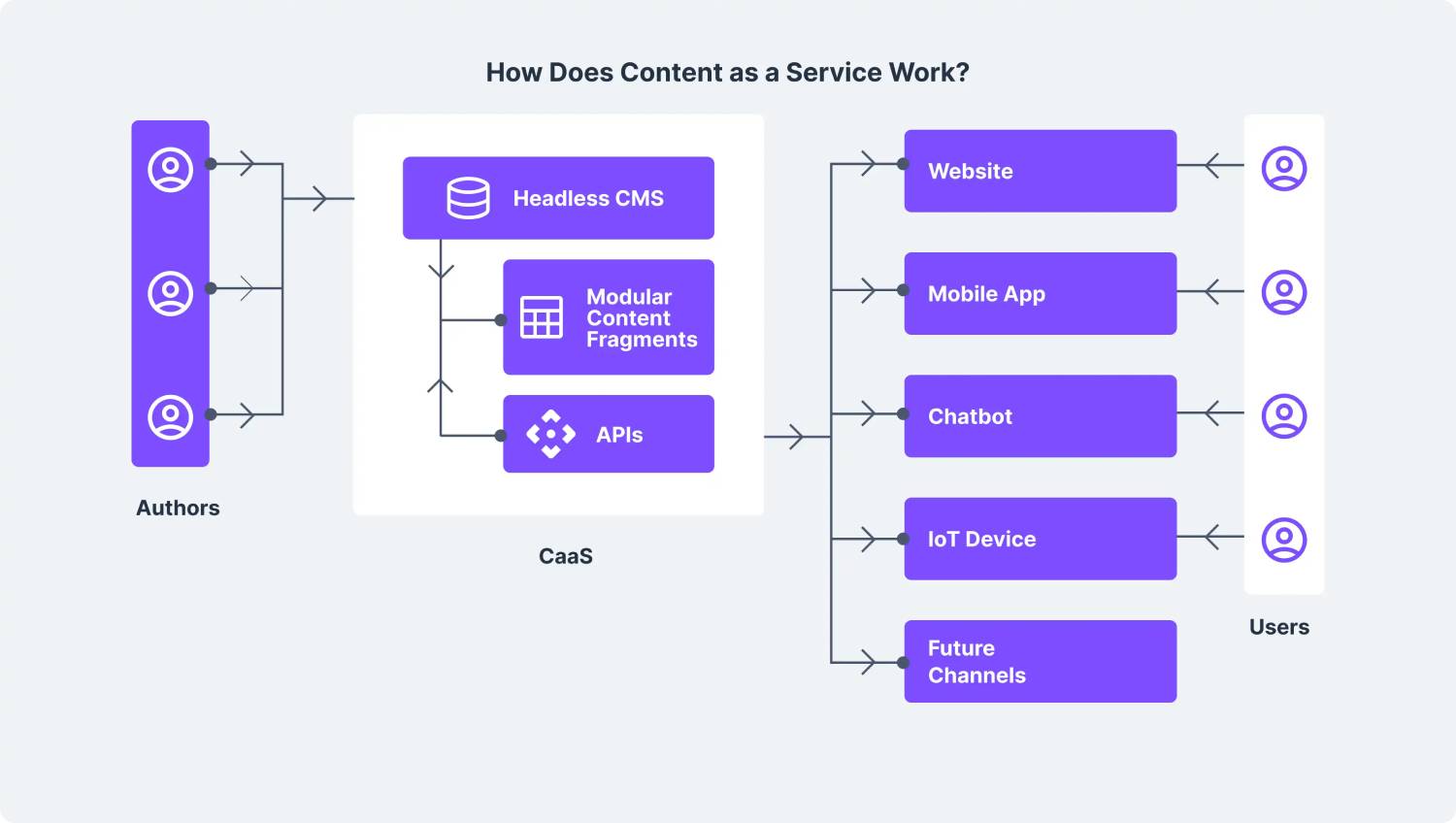
A microservices-based CMS architecture is a modern way to build content management systems that are scalable, flexible, and cost-effective. Instead of relying on a monolithic system, this approach breaks development into smaller, independent services. This structure allows teams to deploy updates faster and manage features more efficiently.
Each service in a microservices-based architecture handles a specific function, such as user authentication or content delivery. These services can be developed and maintained separately, making updates easier without affecting the rest of the system.
This approach offers several benefits, including faster development, improved scalability, better security, and reduced maintenance costs. It also supports smooth integration with multiple platforms, allowing teams to build tailored systems for specific needs.
Choosing the right CMS platform is crucial to making the most of microservices architecture. Popular options like WordPress, Drupal, and Joomla each have unique features, so it’s important to compare them before deciding.
Exploring the Benefits of a Microservices Architecture
Developers often turn to microservices-based CMS architecture for better performance and flexibility. This model breaks an application into smaller services that operate independently but work together as a whole. It comes with several key advantages:
- Increased Scalability: Services can be scaled individually to meet changing traffic needs, improving performance without overhauling the entire system.
- Faster Processing: Lightweight services typically respond more quickly than larger, monolithic systems.
- Simple Testing: Testing smaller, isolated services is easier and more efficient, leading to better quality and faster development.
Overall, microservices architecture helps developers build high-performing applications with greater control and flexibility.
Choosing the Right CMS Platform for Your Project
Selecting the right CMS platform is essential when using a microservices-based approach. It should be scalable, cost-effective, user-friendly, and secure. Here are key factors to consider:
- Scalability: Ensure the platform can handle your traffic and scale with your project’s growth.
- Cost: Compare different platforms and their pricing models to stay within budget.
- Ease of Use: Choose a platform with an intuitive interface and good customer support.
- Plugins and Integrations: Look for platforms that offer flexibility through add-ons and integrations.
- Security: Make sure the platform supports encryption and strong authentication protocols.
Doing thorough research will help ensure you choose the right CMS to support your microservices-based setup.
Understanding the Monolithic vs. Microservices Debate
One key decision in CMS architecture is choosing between monolithic and microservices-based models. Each has its pros and cons:
- Monolithic Architecture: Combines all components into one unit. It’s easier to manage but harder to scale and update.
- Microservices Architecture: Separates features into individual services. It offers better scalability and flexibility but requires more complex management.
If you plan to scale in the future, a microservices approach is often more suitable. However, for simpler needs, a monolithic CMS may work just fine.
Building and Deploying Services for Your CMS
After selecting a CMS platform, the next step is to build and deploy your services. You can either write custom code or use pre-built components to save time. Once the services are ready, deploy them by setting up the environment and ensuring communication between services is smooth.
Key steps include:
- Choosing technologies for communication, such as HTTP or REST APIs.
- Setting up load-based scaling to manage resource usage effectively.
- Implementing a CI/CD pipeline for fast, automated deployments.
These steps will help ensure your CMS is scalable and ready for future updates.
Setting Up Deployment Environments
Deploying microservices requires setting up environments tailored to each service’s needs. Start by identifying requirements like operating systems, libraries, and databases. Then choose a hosting provider and configure server settings accordingly.
Popular options include AWS, Azure, and Google Cloud. You may also use containerized solutions like Docker and orchestrators like Kubernetes for flexible deployments. Setting up environments properly ensures smooth and efficient service operation.
Designing Data Models for Services Working Together
Effective data modeling is crucial for enabling communication between microservices. While services function independently, they must share data seamlessly to function as a unified system.
When designing data models, consider:
- What data needs to be exchanged between services
- How services will identify and authenticate each other
- Using structured and unstructured data formats (e.g., images, documents)
- Implementing strong security protocols and unique service identifiers
Well-designed data models improve performance and ensure reliable, secure communication across services.
Automating Workflows for Efficiency and Productivity
Automation plays a key role in a microservices-based CMS. Automated workflows can trigger tasks like sending emails, updating records, or notifying teams when specific events occur.
Benefits of automation include:
- Reducing manual work and human error
- Improving data accuracy and consistency
- Speeding up communication and collaboration
- Tracking progress and identifying process bottlenecks
Automating workflows helps improve both productivity and the overall user experience.
Logging Events and Errors for Monitoring and Debugging
Logging is essential for monitoring and debugging microservices. It helps track service performance, detect errors, and identify improvements.
To implement effective logging:
- Log important events, state changes, and errors
- Use centralized storage for easy access and analysis
- Ensure real-time or near-real-time logging for faster issue resolution
With proper logging, you can quickly identify issues and maintain reliable CMS performance.
Testing and Verifying Service Stability and Security
After deployment, testing is crucial to verify stability and security. Each service should be evaluated for performance, responsiveness, and functionality.
- Test data transfer between services to ensure accuracy
- Use encryption and secure communication protocols
- Run security scans and apply patches regularly
- Monitor services continuously with automated tools
Ongoing testing helps you detect issues early and maintain a secure, stable CMS.
Deploying and Integrating Services in Your Production Environment
Once services pass testing, deploy them to the production environment. Platforms like AWS or Azure offer secure hosting options. Each service should have its own route and proper authentication.
Integration involves linking each service with the CMS and configuring communication. Once everything is connected, test the full system to ensure it’s secure and working smoothly.
Maintenance and Support Strategies for Ongoing Success
Ongoing maintenance is key to the success of a microservices-based CMS. A good strategy includes:
- Regular performance monitoring and system checks
- Timely security updates and patching
- Maintaining detailed error logs for quick troubleshooting
- Frequent backups to prevent data loss
- Training support staff to handle system updates and user issues
With a strong maintenance plan, your CMS will stay secure, efficient, and reliable in the long run.
Related Reading
- How search engines are really treating AI-generated content in 2025 — an evidence-based view How Search Engines Treat AI-Generated Content in 2025
- GraphQL in CMS architecture - Data Fetching Made Efficient
Planning a content platform?
Headless, traditional, or custom — we help teams pick and build the CMS architecture that fits how they actually work.
CMS strategy, architecture, and implementation.
Discuss your CMSA technical conversation, not a sales pitch.