
Secure Logins Implementing SSO in CMS Environments
Introduction – Overview of SSO and Why It’s Important
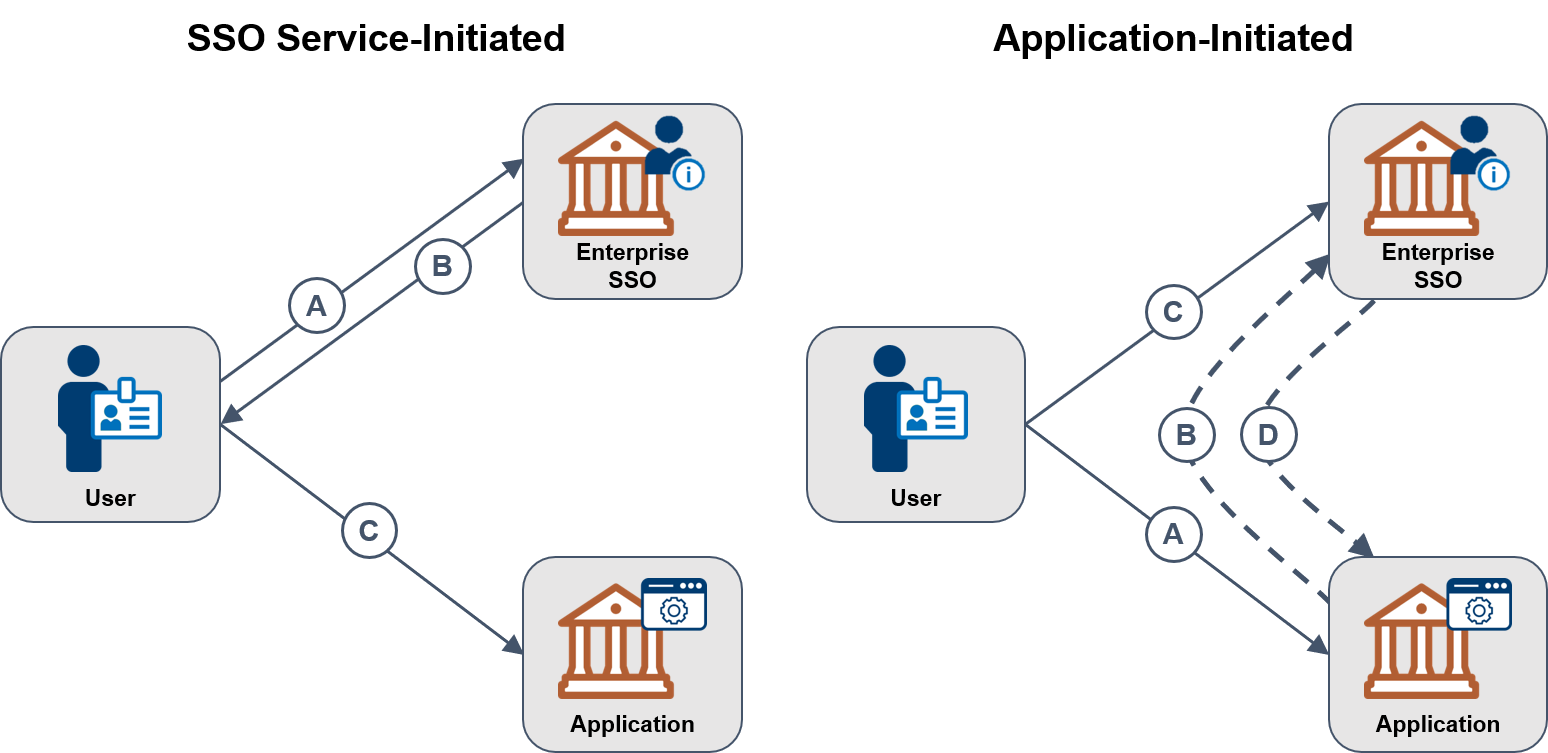
Single Sign-On (SSO) is an authentication method that allows users to access multiple services or applications using a single set of credentials. This eliminates the need to remember and manage different usernames and passwords for each service. With SSO, users can log in once and gain access to various connected systems, simplifying authentication and enhancing security.
SSO is increasingly used in Content Management System (CMS) environments. A CMS allows users to create, manage, and publish content on a website. By integrating SSO, organizations can efficiently manage user identities, improve authentication, and protect sensitive data. SSO also enhances user experience, strengthens security controls, and reduces administrative overhead.
For administrators, SSO provides a streamlined way to manage access across platforms. It ensures users are verified before granting access, helping minimize risks and safeguard against unauthorized activity.
Overall, SSO improves convenience, boosts security, and simplifies access management—making it a valuable solution for CMS-based environments.
Best Practices for Implementing SSO in CMS Environments
Implementing SSO in a CMS can greatly improve user convenience and system security. To ensure a smooth integration, consider the following best practices:
- Assess your organization’s security needs and choose an authentication strategy that fits the CMS platform.
- Understand how identity management, authentication, and authorization will be handled.
- Evaluate supported SSO protocols and products based on the CMS platform you’re using.
- Compare SSO solutions with other login methods and analyze the security risks involved.
- Design with performance, user experience, and scalability in mind to avoid implementation issues.
- Establish clear access controls and be ready to troubleshoot common issues post-deployment.
Following these practices will lead to a more secure and reliable SSO integration in your CMS environment.
Understanding User Identity Management, Authentication & Authorization
Effective user identity management is key to CMS security. Authentication verifies who the user is, while authorization defines what they can access. Together, they ensure only approved users access the right content and features.
Authentication typically involves verifying a username and password. Authorization assigns roles or permissions, dictating which parts of the CMS users can interact with.
Identity management involves tracking users, their credentials, and access rights. It also includes logging user actions to maintain accountability and support audits.
By managing these components, CMS administrators can protect data and control who can perform actions within the system.
Review of Common SSO Protocols & Products Supported in CMS Platforms
There are several protocols and tools available to enable SSO in CMS platforms. Here are some of the most commonly used:
- OAuth 2.0: Allows secure third-party access to user data without sharing login credentials.
- SAML: An XML-based protocol that enables secure identity exchange between service and identity providers.
- OpenID Connect: A layer built on OAuth 2.0 that adds authentication capabilities with secure token handling.
Popular SSO products include:
- Auth0 – a cloud-based identity platform with easy SSO setup
- Okta – a scalable identity management solution
- OneLogin, Duo Security, and Ping Identity – other widely-used identity providers
Each protocol and product has unique strengths. Choose based on compatibility with your CMS, security features, and user requirements.
Comparative Review of SSO & Multiple Login Solutions
SSO and multiple login solutions each offer different benefits and drawbacks. Here’s how they compare:
- SSO: Provides one-time login across multiple applications. It centralizes credentials, boosts security, and enhances user experience.
- Multiple Logins: Requires users to sign in separately for each service. This can offer more isolation but creates more complexity and increases risk of password reuse or user error.
When choosing between SSO and multiple login solutions, consider user convenience, security requirements, resource management, and the technical limitations of your CMS.
Identifying & Assessing Security Implications & Potential Risks
While SSO improves usability and access control, it also introduces certain security concerns. If compromised, a single SSO account can grant access to multiple systems.
Common risks include:
- Centralized credentials becoming a single point of failure
- Exploitation of weak or outdated SSO configurations
- Data breaches involving sensitive identity or session data
- Vulnerabilities from third-party SSO services integrated into the CMS
To mitigate these risks:
- Enforce multi-factor authentication (MFA)
- Use encrypted connections and secure protocols
- Perform regular audits and apply updates promptly
- Monitor user activity for anomalies
Understanding and addressing these risks is critical to a secure SSO implementation.
Design Considerations for SSO Integration with CMS Platforms
User Authentication & Authorization
Define how users are authenticated and what access they have. Ensure your CMS supports role-based access control and that your SSO provider integrates seamlessly.
Security Risks & Access Controls
Conduct a risk assessment before integration. Define access control policies and data protection rules. Make sure user data complies with regulations like GDPR or HIPAA if applicable.
Implementation Challenges
Challenges may include compatibility issues, API integration errors, or limitations in CMS plugins. Plan for onboarding workflows and potential system updates that may affect SSO compatibility.
Planning for these design elements ensures a smooth and secure deployment of SSO in your CMS environment.
Implementing Single Sign-On in a CMS Platform
To implement SSO effectively in a CMS, follow these steps:
- Choose an SSO solution that fits your CMS requirements.
- Review supported protocols and tools for compatibility.
- Define identity management and access rules.
- Assign and manage SSO APIs and credentials securely.
- Establish proper access controls and monitoring systems.
- Test thoroughly and address any issues during setup.
Working with skilled IT professionals can help streamline this process and ensure a secure, high-performing integration.
Establishing Access Controls & Management
Access control is essential for a secure CMS with SSO. Define roles, set permissions, and limit access based on user responsibilities.
Options include:
- Role-based access: Assign permissions by role (e.g., admin, editor, viewer)
- Attribute-based access: Use specific user attributes to define access levels
- IAM tools: Integrate Identity and Access Management platforms for centralized control
Proper access control ensures only the right users can access the right data at the right time.
Assigning & Managing SSO APIs & Credentials
APIs are the link between your CMS and the SSO provider. Configure API endpoints to handle authentication requests securely.
Credential management best practices include:
- Use secure authentication tokens or certificates
- Regularly rotate credentials and passwords
- Limit API access based on user roles or IP addresses
- Audit and log all credential usage and login attempts
Effective API and credential management enhances SSO security and reliability.
Troubleshooting & Resolving Common SSO Issues
SSO issues can include failed logins, incorrect permissions, or API connection errors. Troubleshooting steps include:
- Check system logs and error messages for clues
- Verify credential accuracy and token expiration
- Confirm API connectivity and endpoint configurations
- Recheck access control settings and user role mapping
Most SSO providers offer documentation and support tools to assist in resolving common issues.
Conclusion – Benefits & Opportunities for SSO in CMS Environments
Integrating Single Sign-On with your CMS offers a secure and efficient way to manage user access. It improves usability, enhances security, reduces IT workload, and ensures consistent user experience across platforms.
SSO reduces password fatigue, lowers helpdesk costs, and provides better visibility into user behavior. With proper planning and monitoring, organizations can gain control over user access while delivering a seamless experience.
By carefully selecting the right SSO protocols, tools, and practices, your CMS environment can become more secure, user-friendly, and cost-effective.
Related Reading
- Implementing Content Import/Export Functionality
- Implementing Search Functionality in CMS Solutions
- Implementing A/B Testing for Content Optimization in a CMS
Planning a content platform?
Headless, traditional, or custom — we help teams pick and build the CMS architecture that fits how they actually work.
CMS strategy, architecture, and implementation.
Discuss your CMSA technical conversation, not a sales pitch.