
Secure Your CMS: Authentication and Authorization Best Practices
Introduction: A Quick Overview of Authentication and Authorization
Securing your Content Management System (CMS) is crucial for protecting your website, business, and users. Two essential components of CMS security are authentication and authorization. In this guide, we explore what these terms mean, how they apply to CMS access, and how to protect your website from unauthorized access.
Authentication verifies that a user is who they claim to be, while authorization determines what actions that user is allowed to perform. Together, they help ensure that only approved users can make changes to your CMS.
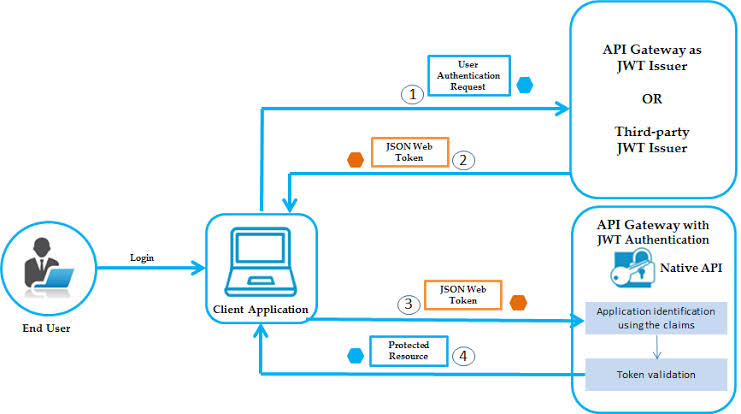
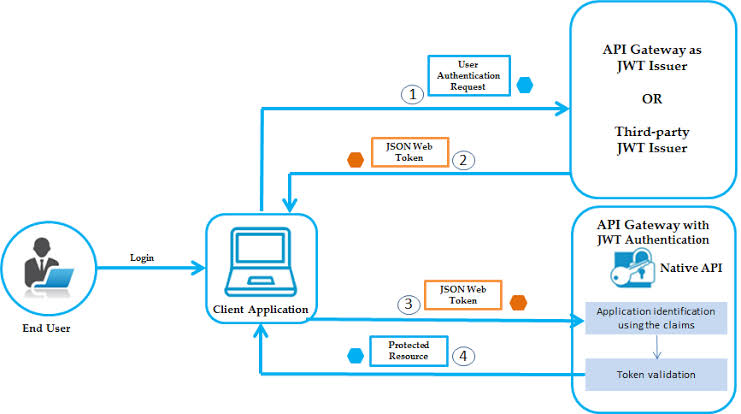
Common methods include passwords, token-based login, two-factor authentication, and role-based access control. Choosing the right mix of these strategies is key to maintaining a secure CMS environment.
By following authentication and authorization best practices, you ensure that only trusted individuals can access your CMS, keeping it safe from malicious activity and maintaining control over changes.
Understanding CMS Authentication and Authorization Terms
Understanding authentication and authorization is fundamental to CMS security. Authentication confirms a user’s identity, often through a username and password. Authorization defines what the authenticated user is allowed to do within the system.
For instance, a verified user might have permission to view content, interact with other users, or edit content based on their authorization level. These rules can be fine-tuned, allowing specific users to manage certain content or features.
Grasping these terms allows you to build better strategies for protecting your CMS from unauthorized access and misuse.
Designing Secure CMS Access to Minimize Risk
To reduce the risk of unauthorized access, design your CMS access controls with security in mind. This includes setting roles and permissions, managing secure logins, and implementing two-factor authentication (2FA).
Setting Up Roles and User Permissions
Assign users to roles with appropriate access levels. For example, admins may have full control, while editors or authors may only have limited access. Only provide users with permissions necessary for their responsibilities.
Creating Logins and Passwords
Ensure each user has a unique and strong password. Avoid shared credentials and encourage regular password updates to minimize vulnerability to brute-force attacks.
Using Two-Factor Authentication
Two-factor authentication adds a second layer of security. It requires a password plus a secondary code, such as one sent via SMS. This significantly reduces the risk of unauthorized access.
Password Policies and Practices for CMS Admin Access
Strong password policies are key to protecting CMS admin accounts. Encourage passwords that are difficult to guess and implement regular update schedules.
- Length: Use at least 8 characters.
- Strength: Mix uppercase, lowercase, numbers, and symbols.
- Frequency: Change passwords every 90 days.
- Reuse: Do not reuse or share passwords.
Use password managers and consider implementing 2FA for password resets. These steps enhance protection against breaches.
Using Two-Factor Authentication for Stronger Security
Two-factor authentication (2FA) greatly enhances CMS security. It requires users to present two different types of credentials—commonly a password and a time-sensitive code or biometric data.
Choose the right type of 2FA for your needs, whether it’s SMS-based, app-generated codes, or biometrics. Make the process user-friendly to ensure widespread adoption and review the settings regularly to keep up with evolving threats.
Implementing Role-Based Access Management for the CMS
Role-based access management (RBAC) allows you to define what each user can access and do. Start by identifying user roles such as admin, editor, or contributor, and assign permissions accordingly.
Review and update roles regularly, especially when staff change roles or leave. Keep a record of permissions changes to maintain audit trails and ensure security integrity.
Creating Actionable Logs within the CMS
Logs track user activities and are critical for detecting and responding to security incidents. Ensure your CMS logs login attempts, content changes, and failed access attempts.
Secure these logs and monitor them regularly to spot anomalies. Logs help you investigate issues and shape future security strategies.
Making Sure Mobile Devices Are Protected When Accessing the CMS
With mobile CMS access on the rise, mobile security is vital. Protect mobile access with multi-factor authentication, strong passwords, encryption, and regular app updates.
Use mobile device management (MDM) to control access and enforce policies. Revoke credentials immediately when employees leave, and educate staff about mobile security best practices.
Strengthening Application-Level Security for the CMS
Application-level security ensures that the CMS itself is protected. Keep your CMS software updated with the latest patches, and run regular security scans.
Use encryption to protect stored content and enforce strict role-based access controls. Audit user roles and activity frequently to ensure the system remains secure.
Automating Security Updates for the CMS
Enable automatic updates to ensure your CMS is always protected against the latest threats. Also, set up automated backups to recover quickly from any potential issues.
Consider using third-party tools to monitor and respond to suspicious activity. Automation saves time and ensures consistent security practices.
Regularly Auditing CMS Permissions and Activity
Auditing your CMS helps ensure only necessary personnel have access. Review roles, passwords, login activity, and access logs regularly.
Deactivate old accounts and remove unnecessary privileges. Use scanning tools to identify technical vulnerabilities and confirm that your CMS is using the latest protocols and patches.
Conclusions: Making Sure Your CMS is Safe and Secure
Keeping your CMS secure requires ongoing attention to best practices. Understand the basics of authentication and authorization, apply strong access controls, and enforce password policies.
Use role-based access, two-factor authentication, and regular audits. Ensure mobile devices and application-level settings are secure, and automate updates to stay protected.
By implementing these security strategies, you can maintain a CMS that is safe, efficient, and resilient against evolving cyber threats.
Related Reading
Planning a content platform?
Headless, traditional, or custom — we help teams pick and build the CMS architecture that fits how they actually work.
CMS strategy, architecture, and implementation.
Discuss your CMSA technical conversation, not a sales pitch.