
Uncover the Right Database for Your CMS Solution
Understand Your Objectives and Requirements
Before you decide on what database to use for your CMS solution, it is important to understand your objectives and requirements. Take some time to think carefully about what you want to achieve with your website or application. What features do you need it to have? What data will it store? Who will use it? How many simultaneous users do you expect? Answering these questions will help you determine what type of database is best for your solution.
For instance, if are looking to build a site that needs to facilitate thousands of concurrent users, you may need a database solution with higher scalability than the typical relational model. On the other hand, if your site will only host a few dozen users, a less sophisticated relational model may be enough. Similarly, if you’re creating an e-commerce shop, you might want to pick a database that offers support for transactions.
Before you decide on the right database for your CMS solution, it’s important to define your objectives, consider your skillset, and assess the data model you’ll need. Doing so will help ensure that you choose the right database for your project.
Assess Your Skillset
Finding the right database for your CMS solution requires careful consideration of your skillset. While some databases are more user-friendly than others, they all require a certain level of technical knowledge to get the most out of them. Before selecting a database, take the time to assess your skills. This includes your experience with database administration, your familiarity with query languages, and your ability to troubleshoot problems.
If you are not comfortable with SQL or have limited experience with database administration, you should look for a database that is easy to use and does not require extensive training. Some databases are geared specifically towards beginners and can be a great option if you don’t have the time or resources to dedicate to complex database design.
It’s also important to assess the level of technical support offered by the database provider. If you are not confident in your technical abilities, then you need to ensure that the database you choose has robust technical support available. Most providers offer various levels of customer service, from basic technical support to enterprise-level solutions. Consider the type of support you need and select a database accordingly.
Finally, assess the amount of time you are willing to devote to learning the database. If you plan to use the database for more than just basic operations, you may need to spend time learning its intricacies. Different databases have different complexities, so take the time to familiarize yourself with the database before making a final decision.
Think About Your Data Model
Before deciding on a database for your CMS solution, it’s important to think about the data model you plan to use. A data model is an approach for organizing and managing data in your system. Data models come in different shapes and sizes, from simple relational databases to complex non-relational models.
The data model you choose will depend on several factors. What type of data do you need to store? What type of queries do you want to perform, and how often? Do you need to keep track of relationships between data points? All of these questions can help you determine which data model best fits your needs.
For example, if you’re looking to store large amounts of information that doesn’t have any specific relationships between it, such as product descriptions or images, a non-relational model such as MongoDB may be the best fit. If, however, you’re creating a customer relationship management web application that requires tracking relationships between different data points, a relational database such as MySQL is likely the better option.
When considering a data model, it’s important to consider scalability. Will your application need more storage and query capabilities as it grows, or will it stay relatively static? Knowing this ahead of time can help you choose the right data model for your needs.
Finally, it’s important to keep in mind the skillset of those working with your data model. If you don’t have the resources available to learn a brand new database language, then a model like MySQL might be better suited for your team’s existing skillset.
Choosing the right data model for your CMS solution has the potential to make or break your project. It’s important to take the time to think through your needs and assess options carefully for the best possible outcome.
Estimate Growth and Resources Needed
When you are selecting a database for your CMS solution, you need to think about how it’s going to grow over time. You must also consider the resources that you will need to manage and maintain it. It’s important to accurately estimate how much data you are expecting to store and the rate at which you expect it to increase.
Start by considering the number of users and transactions you anticipate as your system grows. Then consider how quickly your data will be increasing and what type of data it will be. All of this will help you decide whether you will require partitions and sharding solutions to ensure a high performance and reliable database system.
You also need to take into account the available resources that you will use when setting up the database. This includes cost, manpower and hardware. For example, if you are using an open source system, you may need to purchase infrastructure such as servers that can be used to store the data. If you choose a proprietary system, you could be paying considerably more in terms of cost.
In addition, you must assess the personnel resources that you have in-house or will need to hire. Is your staff well-versed in database management or will additional training and support be required? Do you need to find external contractors with specialized skills in database administration and IT security?
By conducting a thorough assessment of your growth expectations and available resources, you can make an informed decision as to which type of database is right for your CMS solution.
Consider the Benefits of Multiple Databases
Using multiple databases in your CMS solution can offer distinct advantages - when they are used correctly. Different databases offer different benefits and functions, so selecting the right combination of databases can greatly enhance your system.
Increased Efficiency
Using multiple databases within your system can help you divide data, or use each database to its own strengths. This can improve efficiency and reduce conflicts between databases, allowing them to work together in harmony.
Flexibility
With multiple databases you’ll have greater flexibility to adapt your system to new technologies and changing needs. It also allows you to add new features or functionality without having to restructure the entire system.
Improved Performance
Each database can take advantage of different strategies to increase performance. For example, your main system may be designed to handle complex queries, while other databases can be used for simpler tasks. This can significantly improve performance.
Reduced Storage Costs
Using multiple databases can help you save on storage costs, as some databases are more efficient than others at storing different types of data. By combining different databases, you can reduce the amount of data stored, as well as the overall cost of storage.
Scalability
Using multiple databases can also help you manage scalability issues. You can easily add more databases as your system grows, which means you can adjust to increased levels of demand, without having to completely restructure your system.
Conclusion
Using multiple databases in your CMS solution can be a great way to enhance your system and get the most out of your data. Evaluate your objectives and requirements, and determine which databases will provide the best benefits and functionality for your particular situation.
Choosing the Right Database for Your Solution
Selecting the right database for your content management system (CMS) solution is a crucial decision. Making the wrong choice can lead to costly mistakes in the long run. The key to making the right choice is understanding your objectives and assessing your skillset. In addition, you should consider the growth of your project and the resources needed to accommodate it.
Understand Your Objectives and Requirements
Before selecting a database for your CMS solution, it is important to clearly understand your objectives. Make sure that your chosen solution satisfies all of your requirements, from scalability to data security. Consulting with a tech-savvy individual or company can help you make an informed decision.
Assess Your Skillset
It is important to consider the skillset of the individuals involved in the project. Database administrators are experienced professionals that understand the complexities of managing a database. If you are not comfortable working with a database yourself, then you should consider outsourcing the task.
Think About Your Data Model
Your data model should be considered when selecting a database. Depending on the types of data you need to store, you may want to choose a relational database that allows for easy searching and querying, or a non-relational database that provides better scalability.
Estimate Growth and Resources Needed
When selecting a database for your solution, you should also consider the future growth of the project. Estimate how much data you will need to store and plan accordingly. Consider the resources that will be necessary to host and maintain your database.
Consider the Benefits of Multiple Databases
If your project is complex and is likely to involve multiple databases, then you may want to consider using several different ones. Doing so can provide maximum scalability and high availability, as well as the ability to use different systems for different tasks.
Choose the Right Database for Your Solution
Ultimately, it is important to select the right database for your CMS solution. Carefully weigh the pros and cons of open source vs. proprietary databases and decide which one is right for your project. Consider a cloud-based database for maximum flexibility and scalability. Test and evaluate your chosen database engine before deploying your solution.
Decide Carefully Between Relational and Non-Relational Models
Choosing the right database for your CMS solution can often be a tricky decision. You’ll need to consider the benefits and drawbacks of both relational and non-relational models, in order to make an informed, educated choice that best suits your requirements.
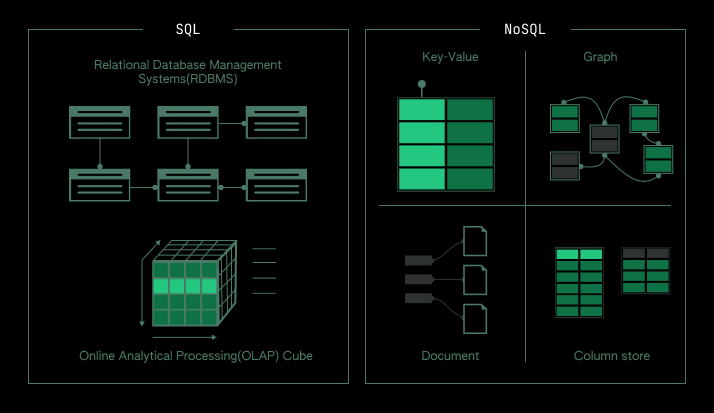
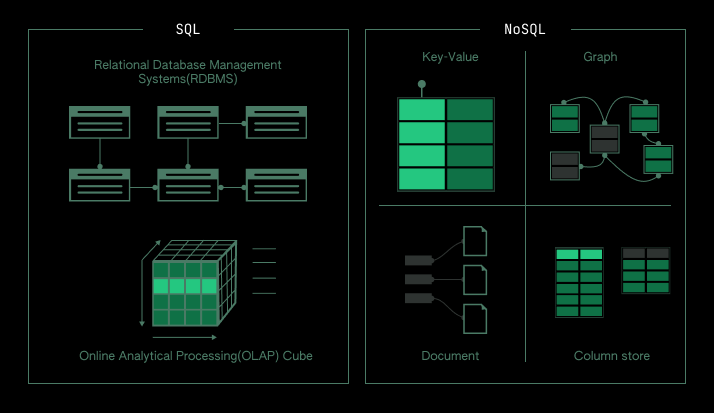
Relational databases are traditionally organised into tables that are connected by explicit relationships. This makes them useful for managing data that can be easily broken down into separate components – such as customer information combined with transaction details. On the other hand, non-relational databases, or NoSQL databases, store data in collections, and don’t require predefined structures. As such, they are ideal for applications where rapid scalability and dynamic data is important.
When it comes to deciding between relational and non-relational models, there are a few key points to consider:
- What type of data are you dealing with?
- How quickly do you need to access and return data?
- How frequently does your data change, and how often do you need to update it?
- What type of web applications will you be using?
Once you have answered these questions, you can begin to narrow down your options and make a decision. If you find yourself struggling to choose between the two models, you may also want to consider the third option of combining relational and NoSQL databases to create a hybrid system. This could offer the best of both worlds for your CMS project, providing flexibility and scalability with the ability to manage complex data types.
Consider a Cloud-Based Database for Maximum Flexibility
When it comes to selecting the right database for your CMS solution, you may want to consider a cloud-based database. A cloud-based database gives you the flexibility to store and access your data from anywhere, at any time. This makes it perfect for businesses that need to access their data on the go or have multiple remote locations.
A cloud-based database also allows you to scale quickly and easily. For instance, if your business suddenly experiences an unexpected surge in website traffic, you can quickly increase the capacity of your cloud-based database. This ensures that you are able to accommodate more visitors without any interruption.
Another advantage of using a cloud-based database is that you don’t have to worry about installing and setting up the hardware and software necessary to run the database. With a cloud-based option, you can simply log in directly and start managing your data right away. This is especially useful for businesses who don’t have the technical expertise or resources to manage a physical database.
Finally, a cloud-based database offers a higher level of security than many physical databases. Cloud-based solutions offer encryption, data redundancy, and other security measures that are designed to protect your data from malicious actors.
When considering a cloud-based database, it’s important to take into account the cost of the service as well as the features it offers. Make sure that the database meets all of your requirements and that it’s compatible with your CMS solution. Additionally, you should research the different cloud-based services available to ensure that you select one that best suits your needs.
Weigh the Pros and Cons of Open Source vs. Proprietary Databases
When it comes to databases, you have two primary types: open source and proprietary. Each option has different benefits and drawbacks, so it’s important to consider both when deciding which one is right for you and your CMS solution.
The most obvious difference between open source and proprietary databases is the cost. Open source databases are generally free to download and use, while proprietary databases require a license to access and typically come with a fee. This means that open source databases may be a better option if you’re working with a tight budget and don’t need the features of a proprietary database.
The next factor to consider is how much control over the database you have. With open source databases, you can customize or extend the functionality by adding new features or tweaking existing ones. On the other hand, with proprietary databases, the vendor typically controls all aspects of the architecture and you are limited to the features they provide.
Finally, you should also consider the availability of support and documentation. Open source databases rely on community support and documentation, whereas proprietary databases usually offer premium support and extensive documentation. Depending on your level of expertise, the availability of this kind of support may be a deciding factor.
Ultimately, the decision between open source and proprietary databases is a personal one and comes down to how much you are willing to spend, how much customization you need, and the level of support you require. Weighing the pros and cons of each option carefully will help you decide which is right for you and your CMS solution.
Selecting an Appropriate Database Engine
When choosing a database engine for your CMS solution, the first step is to understand what types of engines are available. There are two main types of database engines: relational and non-relational. Relational databases are generally used for more structured data, while non-relational databases are often better suited for larger amounts of data that are often unstructured.
The next step is to choose an appropriate engine for your solution. To make this decision, consider the resources you have available and the complexity of your data. Some database engines may not be able to handle the volume and complexity of your data, while others are well suited for large data sets. Additionally, you’ll want to consider cost and performance as different engines offer different levels of performance at different price points.
When comparing database engines, look at features such as query languages, transaction support, scalability, security, and reliability. A good query language should enable you to efficiently store, retrieve, and manipulate data. Transaction support allows data to be written, stored, and retrieved without affecting other transactions. Scalability refers to the ability of an engine to handle increasing loads as demands grow. High levels of security ensures that only authorized users can access the data, and reliable backups ensure that data is never lost or corrupted.
It is also important to consider ease of use. A good database engine should be easy to install, configure, and maintain. You’ll also want to look at ease of integration with other applications and databases. Finally, consider the support offered for the engine you choose. It’s always a good idea to have access to technical support, especially if you’re working with complex data sets.
By taking the time to select an appropriate database engine, you can ensure that your CMS solution is running optimally and efficiently.
Leveraging DB-agnostic Platforms
A database-agnostic platform is a useful option if you’re looking for a CMS solution that doesn’t require extensive coding. Such platforms provide a consistent software foundation, with support for multiple database systems. This makes it easy for your team to manage data and content, without worrying about compatibility and performance.
When selecting a database-agnostic platform for your CMS solution, consider the following factors:
- Ability to switch databases without making major changes to your code.
- Database engines supported by the platform.
- Cost of the platform, including licensing fees.
- Access control - hardware, software, and policies.
- Scalability - will the platform be able to handle your anticipated growth?
- Data security - policies, encryption, etc.
- Client-side support - applications, plugins, libraries, etc.
- Maintenance needs - bug fixes, updates, etc.
Using a DB-agnostic platform is a great way to get your CMS solution up and running quickly. Because you can switch between database systems without making major changes to your code, you can easily optimize performance in the future. As your business grows, you can choose the best database system for the job without having to start from scratch.
Before deciding on a DB-agnostic platform for your CMS solution, do your research. Make sure the platform you choose supports all the necessary database engines and offers the features you need. Talk to other companies who are using the same platform and get their feedback. And finally, test out the platform yourself, to make sure it meets your requirements.
Testing to Ensure Your Solution is Right for You
Making sure you have the right database solution for your CMS is important. Once you have selected the solution and implemented it, it’s time to test it. This will help ensure that the solution is working efficiently and meeting your CMS needs.
Testing your database is a collaborative process between the developers and users to make sure everything is working correctly. This process should include running tests against the expected data and testing the response times to ensure that they meet the expected timeframes. It is also important to check if the database is secure from potential threats, and that it is properly backed up.
The following steps should be taken during the testing phase:
- Create user accounts and test their access to the site/application.
- Check that queries are executing correctly and efficiently.
- Test the database’s backup and recovery system.
- Monitor the performance of the server and database over time.
- Run tests against the expected data and results.
- Look for any security vulnerabilities.
Testing your CMS database solution is an important step in making sure that it is meeting your needs. By running tests and monitoring performance over time, you can be confident that your CMS is running well and is safe from potential threats.
Related Reading
- Key Considerations When Choosing the Right CMS for Your Business
- Master Managing User Roles and Permissions with a CMS Solution
- how to distribute content to the right audience
Planning a content platform?
Headless, traditional, or custom — we help teams pick and build the CMS architecture that fits how they actually work.
CMS strategy, architecture, and implementation.
Discuss your CMSA technical conversation, not a sales pitch.