
Unlock Benefits of Content Previews and Approvals for Your CMS
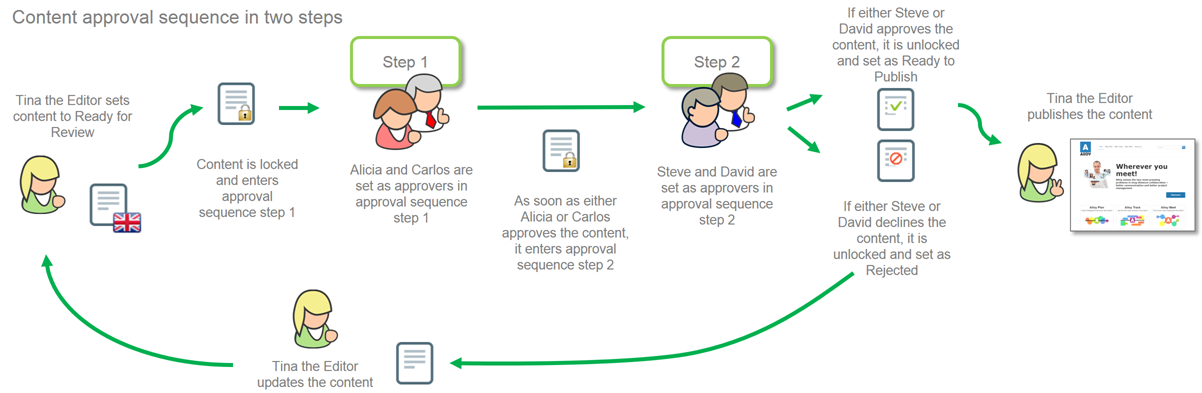
The Benefits of Content Previews and Approvals
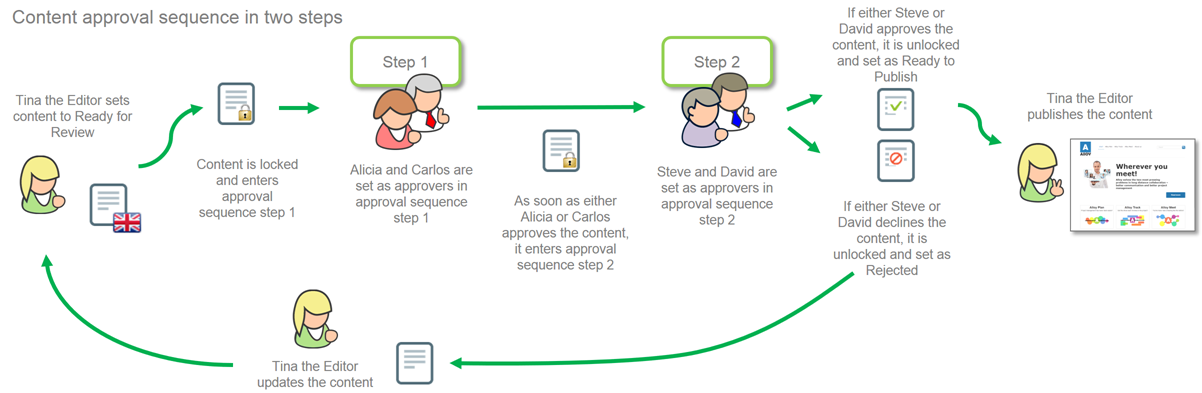
Content previews and approval workflows are essential for managing content effectively in a CMS. With a solid system, teams can create, review, and approve content more quickly and accurately. These workflows streamline content management, improve collaboration, and save valuable time.
They help ensure accuracy and consistency in all published content. Previews allow teams to check for errors, maintain branding, and ensure messaging is targeted. Stakeholders can also review content before publication to align it with audience expectations.
Content approvals reduce the risk of last-minute revisions and mistakes. Since content is reviewed in advance, it minimizes rushed updates and helps maintain content quality.
Moreover, approval workflows allow for better project tracking. By assigning clear roles and deadlines, teams can keep content production on schedule and avoid delays.
Understand the Necessary Prerequisites
Before implementing a preview and approval system in your CMS, certain prerequisites must be in place. These foundational elements ensure a smooth and effective process.
- Infrastructure: Ensure your CMS supports multiple users, version control, and secure draft storage to protect unpublished content.
- Roles and Responsibilities: Define who creates, edits, and approves content. Assign clear ownership for each stage to avoid confusion.
- Automation: Consider using automation for status updates, notifications, and reporting to reduce manual workload.
- Scalability: Plan for growth by choosing systems and workflows that can scale with increasing content volume and team size.
Having these elements in place helps ensure a successful setup and reduces issues later in the workflow.
Identifying the Stages of Content Creation and Release
Understanding the content lifecycle helps streamline production and improve coordination. Typically, there are five stages:
- Planning: Define the purpose, format, and key topics.
- Drafting: Create the first version of the content collaboratively.
- Editing: Review for clarity, accuracy, and completeness.
- Proofreading: Check spelling, grammar, and compliance with guidelines.
- Publishing: Release content to the appropriate channels.
Following these steps ensures a consistent and high-quality output.
Integrating Content Previews and Approvals to Your CMS
Integrating approvals into your CMS improves accountability and helps deliver better content. Choose the method that fits your team’s needs best:
- Manual Process: Editors review and approve each piece manually, ensuring control but requiring more time.
- Automated Process: The system auto-approves based on rules, offering speed but less oversight.
- Editor-Assisted Automation: Editors approve changes within a partially automated process for balance.
- Hybrid Process: Combine both manual and automated steps, automating simple tasks while reviewing critical ones manually.
Select the method that aligns with your content goals and team capacity.
Explaining the Value of Creating Reusable Automations and Reports
Reusable automations and reports boost efficiency. They help monitor progress, identify bottlenecks, and reduce repetitive tasks.
For example, dashboards can track the number of pending, approved, or completed previews. This data gives visibility into the workflow and helps optimize it.
Automated alerts can also notify reviewers when content is ready, eliminating the need for manual updates. Reports centralize feedback and support faster decision-making.
In short, automation and reporting streamline the workflow and free up time for content quality and strategy.
Configure Your System Workflows
Proper configuration of system workflows helps ensure content approval processes are well-structured and efficient.
Start by identifying key workflow steps and responsibilities. Assign roles, define actions, and establish deadlines. Set rules for how content progresses through each stage and what happens if it needs revisions.
Create a visual flowchart to represent the workflow. This helps teams understand the process and identify inefficiencies.
Finally, train all stakeholders. Clear guidance ensures everyone understands how to use the system and what’s expected of them.
Create an Approval Process Flow Chart
An approval flow chart provides a visual overview of each content stage. It maps out responsibilities, timelines, and feedback loops.
Include key steps like who creates the content, who reviews it, and when it should be published. Also, build in review and revision stages.
Review the chart regularly with your team and update it as workflows evolve. Track revisions and make sure all stakeholders are aligned on the process.
Assign Roles and Responsibilities for Approvers
Clearly assigning roles ensures smooth content flow and quality control. Define who reviews content and what each approver should check for — from grammar to branding.
Some roles may include media reviewers for images and videos, while others focus on written content. Outline expectations for each role and make deadlines clear.
Ensure approvers have access to the tools and resources they need, and document steps for escalation if issues arise.
Designating an Editor to Review Changes and Update Webpages
Appointing an editor to oversee webpage updates is critical. The editor checks that changes meet quality standards and align with branding.
This role helps catch errors before content goes live and ensures all updates are intentional and accurate.
Choose someone familiar with your CMS and workflow tools. Give them guidelines and access to change notifications so they can respond promptly.
Monitor and Track Workflow Progress
Monitoring helps you identify inefficiencies and improve workflows. Track how long each step takes and how much content passes through each stage.
Create reports to measure performance. If certain content keeps getting sent back for revision, investigate and improve that step.
Review your workflow regularly to ensure it remains efficient and aligned with your team’s goals.
Produce Daily Reports on Workflow Performance
Daily reports provide insights into content pipeline performance. Track key metrics like completed tasks, average review time, and delays.
Use these reports to identify trends or blockers. For example, if content takes longer to approve, you may need more reviewers or clearer instructions.
Automating these reports saves time and helps teams focus on delivering better content instead of compiling data manually.
Scaling with Increasing Workflow Volume
As your content production grows, scalability becomes vital. Here are key strategies:
Workflow Automation
Automate repetitive tasks to reduce manual effort and improve speed. Automation ensures consistency and reduces human error.
Responsibility Delegation
Distribute tasks clearly. Assign ownership for each step and ensure everyone knows their role to avoid overlap or confusion.
Process Documentation
Create and maintain documentation of workflow processes. This ensures new team members can onboard quickly and follow established procedures.
Data Analytics
Use analytics to identify trends and improve efficiency. Tracking performance helps you pinpoint issues before they escalate.
Related Reading
- Unlock Benefits of Content Versioning and Collaboration
- Unlock Content Retention Strategies: Leverage a CMS
- Unlock Efficiency: Streamline Content Processes and Workflows
Planning a content platform?
Headless, traditional, or custom — we help teams pick and build the CMS architecture that fits how they actually work.
CMS strategy, architecture, and implementation.
Discuss your CMSA technical conversation, not a sales pitch.