
Unlock Omnichannel Content Delivery with Headless CMS
Introduction to Headless CMS
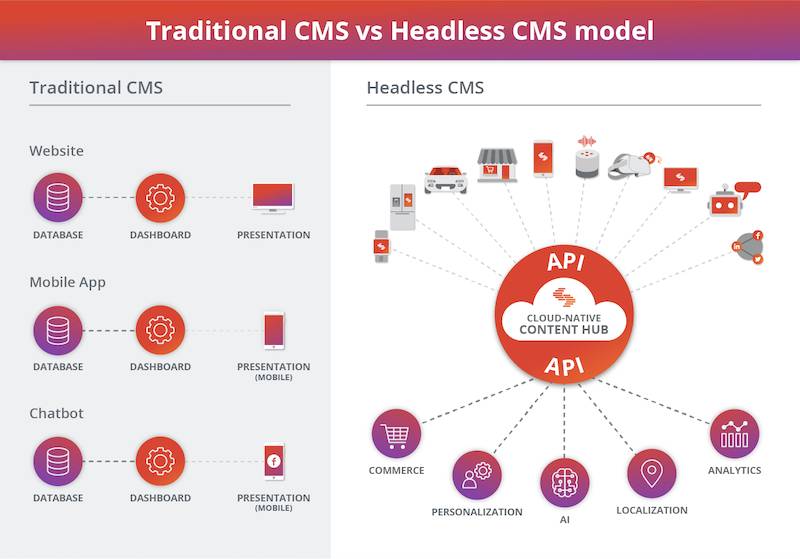
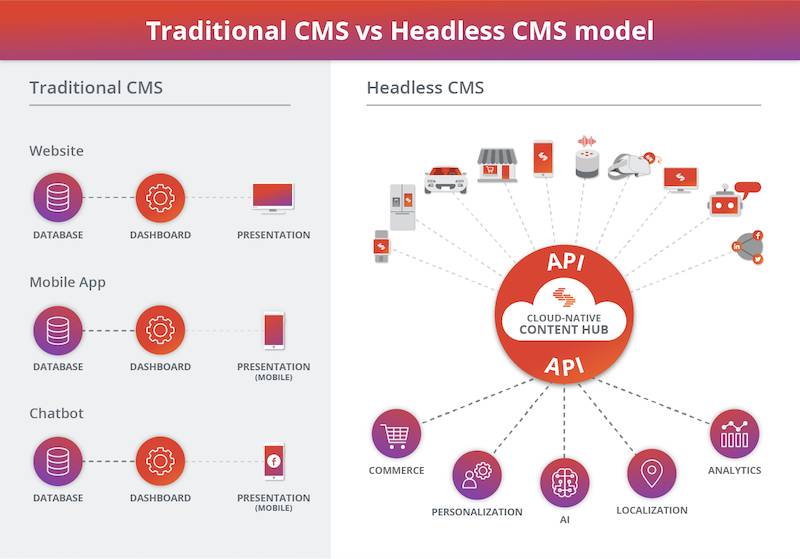
A headless content management system (CMS) is a modern way to deliver content across multiple digital channels efficiently and cost-effectively. Also called a ‘decoupled’ CMS, it separates the front-end (user experience) from the back-end (content management).
This approach has gained popularity as businesses aim to streamline content delivery. By eliminating the need for a front-end website or app, headless CMS allows content to be created once and published everywhere from a single source.
This guide explores headless CMS architecture, its benefits and limitations, common use cases, and how to choose and implement the right platform for your business. We’ll also cover essential security and deployment tips.
What is a Headless CMS?
A headless CMS decouples content storage and management from its presentation. Instead of combining everything in a single system, it delivers content via APIs. This makes it ideal for businesses that distribute content across multiple platforms and devices.
With no built-in front-end (the “head”), it functions as a content repository accessed via API. Developers can build custom front-ends using any tech stack they prefer, making it highly flexible.
Unlike traditional CMS platforms, a headless CMS offers greater control over how and where content appears. It allows teams to publish consistent, tailored content across channels such as websites, mobile apps, and IoT devices.
Benefits of Using Headless CMS
Headless CMSs offer powerful advantages for teams managing content across many platforms. They enable quick access and consistent delivery on any device.
Developers can update content without affecting the design, thanks to API-based access. This speeds up the development cycle and ensures structural stability.
Scalability is another key benefit. Teams can add content or data sources as needed without disrupting the system. Editors and developers can work more efficiently with real-time previews and collaboration tools.
Most importantly, headless CMSs ensure that your content works across all devices, providing a seamless user experience no matter the platform.
Advantages of Going Headless
Going headless offers more flexibility, faster development, and improved performance. Developers can fully control front-end design and user experience, while content is stored centrally for easy reuse.
Scalability is easier with headless architecture. New features or platforms can be added without overhauling the entire system, supporting faster iteration and reduced costs.
Separating front-end and back-end also boosts performance. Websites load faster, and users get a better experience, even with large content volumes or growing traffic.
Disadvantages of Going Headless
While headless CMSs offer many advantages, they also come with some challenges. First, they require more technical skills. Developers must create and manage the front-end separately, which can be difficult for less technical teams.
Costs can also be higher, especially with pay-as-you-go pricing models. Managing large amounts of content or scaling up traffic can increase expenses.
Content migration from a traditional CMS can be time-consuming. Manual entry or custom scripting may be needed to transfer existing data.
Finally, scaling can require complex custom solutions. Unlike traditional CMSs with built-in scalability tools, headless CMSs often need extra coding and infrastructure planning.
Common Use Cases for Headless CMS
- Multichannel Delivery: Publish content across web, mobile, smart TVs, kiosks, and more from one central system.
- Multi-screen Experiences: Deliver tailored content optimized for each screen or device type.
- Continuous Content Deployment: Update and deploy new content frequently without affecting design layers.
- Third-party Integrations: Easily connect your CMS to CRMs, eCommerce tools, analytics platforms, and more using APIs.
These use cases show how headless CMSs support fast, scalable, and flexible content management across modern digital ecosystems.
Architectural Design Considerations
When planning a headless CMS architecture, you must focus on scalability, flexibility, security, and availability.
- Scalability: Ensure the infrastructure can handle growing user and content demands.
- Flexibility: Choose a system that can adapt as business needs evolve.
- Security: Use best practices, including authentication, encryption, and secure APIs.
- Availability: Design for high uptime with cloud hosting or content delivery networks (CDNs).
These considerations help you build a CMS that supports long-term growth and high-performance content delivery.
Understanding Content Modeling
Content modeling defines how content is structured and delivered across devices. It is essential for both back-end scalability and front-end user experience.
Using JSON or similar formats, content models define types, fields, relationships, and permissions. The goal is to create modular, reusable content blocks that can be published across channels with minimal rework.
Effective content modeling ensures your CMS delivers content that is discoverable, accessible, and tailored to the audience’s needs.
Finding the Right Headless CMS Platform
Understanding Your Requirements
Start by identifying what kind of content you manage, which channels you serve, and what your business goals are. This helps narrow down suitable CMS options.
Researching CMS Solutions
Explore user reviews, feature lists, and vendor case studies. Compare solutions on platforms like G2, Capterra, or TrustRadius.
Analyzing Support & Documentation
Ensure the vendor offers solid customer support, tutorials, and technical documentation to assist your team during setup and maintenance.
Testing the Platform
Most vendors offer free trials. Use these to evaluate usability, features, and performance before making a commitment.
Choosing the Right Headless CMS
Features & Functionality
Does it support content APIs, multi-site delivery, and localization? Ensure it meets your technical needs.
Usability
Choose a platform that’s easy for developers and content editors alike to use effectively.
Vendor Support
Evaluate the vendor’s support team, response times, and resources like training or onboarding help.
Scalability & Reliability
Make sure the platform can grow with your content and traffic demands without major performance drops.
Deployment and Security Considerations
Deployment should be scalable, secure, and flexible. Choose cloud or on-prem hosting based on your needs.
- Use secure authentication methods (OAuth, 2FA)
- Encrypt data in transit and at rest
- Deploy robust backup and disaster recovery systems
Security is essential when delivering content across public channels. Always stay current with patches and updates.
Final Thoughts – Empowering Omnichannel Content Delivery
Headless CMS empowers businesses to deliver content faster, more securely, and across more channels. With the right platform and architecture, you can achieve seamless omnichannel content delivery.
Start by clearly understanding your needs, choosing a flexible and secure platform, and structuring your content effectively. Then, scale and evolve your CMS to meet the demands of your users and your business.
With a well-planned headless CMS, you can boost engagement, reduce time-to-market, and stay ahead in the fast-changing digital world.
Related Reading
- Accelerate Content Delivery: Introduction to CDNs
- Achieve High Performance with Content Delivery Networks (CDNs)
- Unlock Benefits of Content Previews and Approvals for Your CMS
Planning a content platform?
Headless, traditional, or custom — we help teams pick and build the CMS architecture that fits how they actually work.
CMS strategy, architecture, and implementation.
Discuss your CMSA technical conversation, not a sales pitch.